Build Your Growth Stack

Confirm or adjust your services and enter your details.

Please select at least one service.
First name is required.
Last name is required.
Please enter a valid email address.

Tag: Video Marketing

  • The 45-Second Rule: Why Short-Form Video Beats Everything Else on Your Feed

    The 45-Second Rule: Why Short-Form Video Beats Everything Else on Your Feed

    Meanwhile, a competing firm’s junior analyst posts a 38-second video filmed on a phone, no script, no edit beyond a few captions, and it outperforms Thornfield’s entire social reach in a single afternoon. That’s not an algorithm glitch. That’s the format buyers are actually watching, and it’s reshaping what “social media strategy” even means.

    This guide breaks down what short-form video actually is, why it’s outperforming nearly everything else on the feed, and how to build a strategy around it that doesn’t collapse into chasing trends your brand has no business chasing. It’s the practical companion to our pillar guide, The Extraction Protocol, which explains why public platforms should work as a frontline, not a hobby.

    What Is Short-Form Video Strategy, and Why Does It Drive Quick Engagement?

    Short-form video strategy means planning, producing and distributing videos under 60 seconds to capture attention fast and drive a specific action. It works because it matches mobile consumption: brief, high-impact, over before the viewer scrolls away. Per HubSpot’s research, short-form video is the most-used format among B2B and B2C marketers, delivering the highest ROI of any content type.

    The rest of this guide shows you how to build that strategy properly, instead of copying a trend that has nothing to do with your business.

    Is Your Current Video Strategy Actually Converting?

    We audit your social video output against what’s actually driving engagement and leads in your industry, then show you the gap.

    Get My Video Strategy Audit →

    Why Short-Form Video Is Winning Right Now

    This isn’t a trend being hyped by agencies with video packages to sell. It’s a measurable shift in where attention and ROI are going. Per HubSpot’s research, short-form video (generally defined as under 60 seconds, with an optimal length of 31 to 60 seconds) is used by 30% of both B2B and B2C marketers, more than any other single format, and the majority of marketers surveyed say it delivers the highest ROI of any content type they produce. Completion data backs this up directly: Vidyard’s analysis of nearly a million B2B videos found clips under one minute hit a 65% completion rate, while videos over 20 minutes drop to just 20%, which is exactly why the short format wins attention it can actually keep.

    The B2B-specific data matters even more for a company like yours. HubSpot’s own team reports that when they tested short-form video on LinkedIn specifically, it generated hundreds, sometimes thousands, more impressions than the same content performed on YouTube. And it’s not just HubSpot’s experience: LinkedIn’s video push reportedly drove a 34% year-over-year increase in video uploads in Q4 2024 and 36% year-over-year growth in total video viewership through 2025. If your prospects are B2B decision-makers, LinkedIn is where this shift is happening fastest, not TikTok.

    What Counts as “Short-Form” Content?

    What is short-form content and video, exactly? The working definition most marketers use is anything under 60 seconds, though platforms keep stretching that boundary, TikTok now allows uploads up to 10 minutes, and both YouTube Shorts and Instagram Reels have extended to 3 minutes. The practical guidance holds regardless: attention spans keep shrinking, so sticking to 60 seconds or fewer is still the safer target while you’re building a strategy.

    Looking at short-form video trends heading into the next year, three patterns are worth building into your plan rather than chasing reactively: branded challenges and filters (which consistently outperform expectations when done well), smaller creator and micro-influencer partnerships over big-name endorsements, and authentic, values-driven content that doesn’t read as corporate marketing copy.

    The major short form video platforms each behave differently, and knowing the difference changes what you post where:

    • TikTok: skews younger, algorithm-driven discovery, highest content velocity
    • Instagram Reels: broader age range, integrates with your existing feed and stories
    • YouTube Shorts: massive built-in audience, strong for driving viewers to your longer content
    • LinkedIn: the one most B2B companies underuse, and per the data above, currently one of the highest-opportunity platforms for this exact format

    The B2B Trap: Why Most Short-Form Video Strategies Backfire

    Here’s where most B2B companies get this wrong, and it’s worth being honest about both sides. The pros and cons of video marketing aren’t the same for every business.

    What works: a specific, credible person addressing a specific, expensive problem your buyer actually has, delivered in under a minute, with no attempt to be funny or viral. This builds exactly the kind of authority our pillar guide describes.

    What backfires: chasing a TikTok dance trend or a trending audio clip because “short-form video is working,” without asking whether that specific format fits an enterprise buyer’s mindset. Thornfield’s first attempt at video, after seeing their competitor’s success, was exactly this mistake: a trending-audio clip with a logo slapped on it, filmed because video was “supposed to work.” It got 200 views and zero inquiries. A finance executive scrolling LinkedIn during a commute is not in the same headspace as a teenager scrolling TikTok for entertainment, and content built for one audience rarely translates to the other. Forcing a B2B brand into consumer-style content usually damages credibility rather than building it.

    The fix isn’t avoiding short-form video. It’s matching the format’s brevity to your actual audience’s actual problem, not to whatever trend is currently circulating.

    How to Build a Video Content Marketing Strategy That Converts

    A real video content marketing strategy needs structure, not just a camera and good intentions.

    The Anatomy of a 45-Second Hook

    The first three to five seconds decide whether anyone watches the rest. A strong structure for this format:

    • The hook (seconds 1-5): state the specific problem or surprising fact immediately. No greeting, no warm-up.
    • The diagnosis (seconds 6-35): explain exactly why the common approach to this problem fails, with enough specificity that the viewer recognizes their own situation.
    • The next step (seconds 36-45): one clear, specific call to action. Not “follow for more.” A specific next step tied to what you just said.

    Thornfield’s second attempt used exactly this structure: their supply chain lead, on camera, stating a specific number their clients kept getting wrong, in the first five seconds. Same topic as the 2,000-word guide. Forty-two seconds instead of 2,000 words. It outperformed every piece of content they’d posted that quarter, and unlike the trend-chasing clip, it generated real inbound inquiries.

    Where to Publish: Platform by Platform

    Don’t post the identical video everywhere and call it a video marketing strategy. Adapt for each platform:

    • Instagram strategy should favor visually polished, punchy captions, and consistent posting; Reels integrate with your existing feed, so consistency compounds.
    • Video marketing on Instagram benefits from smart use of trending audio, but your core message should never depend on the trend outliving your post.
    • LinkedIn rewards a more direct, substantive tone, which is exactly why it outperforms for B2B, per the data above, and exactly where Thornfield’s video succeeded.

    Video marketing examples worth studying (not copying) include brands using branded filters to drive organic try-on engagement, micro-influencer partnerships that trade reach for trust, and simple founder-to-camera diagnostics that lead with a specific number or result.

    A simple video marketing checklist before you publish anything: does the first 3 seconds hook attention, is the message clear without sound (most viewers watch muted), is there one specific call to action, and is it formatted vertically for mobile.

    Want a Video Strategy Built Around Your Actual Buyers?

    We build the hook structure, the platform mix and the production workflow so your team isn’t guessing what to post next.

    Book My Video Strategy Session →

    Social Media Videos in Practice: By Platform and Use Case

    Social media videos and social media video marketing work differently depending on what you’re trying to achieve, and matching the use case to the platform matters more than posting volume:

    • Top-of-funnel awareness: short diagnostic videos on LinkedIn and Instagram, built around a specific pain point
    • Mid-funnel trust-building: client testimonials and case study clips, reused across platforms
    • Bottom-funnel conversion: product or service walkthroughs, FAQ-style clips answering the objections your sales team hears most

    A real social media marketing management services program coordinates all three, rather than posting whatever’s easiest that week.

    Social Media Management Services: Why Video Needs a System, Not a Side Project

    This is where most companies stall, Thornfield included. One good video is a lucky post. Video strategy without operational infrastructure behind it produces a burst of good content, then silence for two months while everyone goes back to their day jobs. Proper social media management services solve exactly this gap.

    What a real system includes:
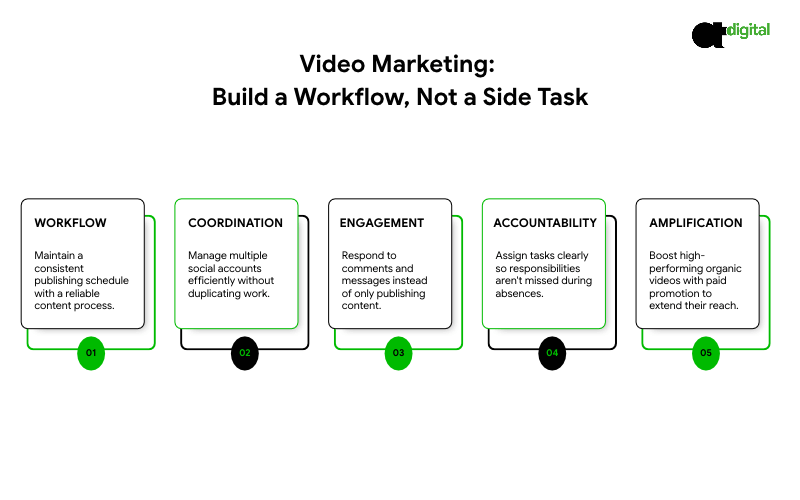
    • A content calendar and workflow that doesn’t depend on one person remembering to post
    • A process for managing multiple social media accounts across platforms without duplicating effort, often the specific challenge behind searches like “how to manage multiple social media accounts for business”
    • Social media community management: actually responding to comments and messages, not just publishing and walking away
    • Clear social media management tasks assigned to specific people, so nothing falls through when someone’s on leave
    • Paid social media management layered on top of organic, so your best-performing organic videos get amplified with budget instead of relying on reach alone

    What does social media management include, when it’s done properly? Strategy and calendar planning, content creation and editing, platform-specific posting and optimization, community management and response, performance analytics, and paid amplification, all working as one connected system rather than five disconnected tasks.

    Social media management tips worth acting on immediately: batch-produce video content in single sessions rather than one-off shoots, repurpose every long recording into several short clips, and track engagement from the right people (decision-makers, not just volume) rather than vanity metrics.

    Tired of One Good Post Followed by Two Months of Silence?

    We build the calendar, the workflow and the production rhythm so momentum doesn’t depend on one person remembering to post.

    Fix My Posting Consistency →

    Hiring Help: Agencies and What to Ask

    If you’re evaluating a social media management agency or comparing a social media management service for a small business package against something built for a larger company, the question isn’t “do they post content.” It’s whether they understand video as a system, not a deliverable.

    What to ask any social media manager services provider or social media ads management company before signing:

    • Do they build platform-specific strategy, or repost the same content everywhere?
    • How do they measure success: engagement volume, or leads and pipeline influence?
    • Who actually produces the video: a dedicated short form strategist, or whoever’s available that week?
    • Can they show real examples of B2B video that drove measurable results, not just view counts?

    If you’re a smaller operation researching social media manager for small business options, or specifically social media management services usa, prioritize a provider who treats your LinkedIn presence as seriously as the more obvious platforms. Based on the data above, that’s where the opportunity currently sits for most B2B companies. For a team that builds and runs this as one connected system, see our social media marketing services.

    The Verdict: The Format Has Already Won. The Question Is Execution.

    Here’s what the data makes hard to ignore: short-form video is already the most-used format by marketers, already delivers the highest ROI of anything they produce, and LinkedIn specifically is seeing double-digit year-over-year growth in both uploads and viewership. This isn’t a bet on where attention might go next. It’s a description of where it already is.

    Thornfield’s story is the whole guide in miniature: a good long-form guide that undersold itself, a trend-chasing flop that proved format alone isn’t the answer, and a structured 42-second video on the exact same topic that beat everything else they’d posted that quarter. The difference wasn’t the budget. It was structured.

    The businesses losing this aren’t the ones without a video budget. They’re the ones posting inconsistently, copying consumer trends that don’t fit their buyer, or treating video as a one-off project instead of a system with a calendar, a workflow and a clear hook structure behind every piece.

    Your competitors are already publishing short-form video to the exact buyers you’re trying to reach. Every week your team debates whether to “get into video” is a week that gap widens. Our video strategy audit looks at what you’re currently producing, benchmarks it against what’s actually working in your industry, and shows you exactly where the system is missing. Book it before your next quarter of content goes out without one.

    Build a Video Strategy That Actually Converts

    Engineering-grade analysis. Pure mathematics. Absolute market capture.
    Deploy My Forensic Ecosystem Audit →

  • User Generated Content Examples: Why a Shaky Customer Video Outsells Your Best Ad

    User Generated Content Examples: Why a Shaky Customer Video Outsells Your Best Ad

    One is a $15,000 studio shoot: perfect lighting, a professional voiceover, a jib shot sweeping across the packaging. The other is 22 seconds of a real customer talking into their phone camera in their kitchen, slightly out of focus, saying “okay so I was skeptical about this but here’s what actually happened.” In market after market, the second ad wins. Not sometimes. Consistently.

    That’s not an accident, and it’s not really about production value. It’s about who’s talking. This guide explains what UGC actually is, shows real user generated content examples across B2B and consumer brands, and gives you a system to source it, use it and stay compliant while you do. It builds on our pillar guide, The Extraction Protocol. If you’d rather have a team run this for you, see our social media management services.

    What Are User Generated Content Examples, and Why Do They Outperform Brand Ads?

    User generated content (UGC) is any content made by customers, clients or fans rather than your marketing team: a LinkedIn post about your results, a phone-shot testimonial, an unboxing clip, a before-and-after photo. It outperforms brand ads because Nielsen finds 88% of consumers trust recommendations from people they know above any paid ad format.

    The rest of this guide shows you where to find that content, how to ask for more of it, and the rules that keep you out of trouble while you use it.

    How Much Proof Are You Leaving Unused?

    We audit your current customer base and social presence to find the UGC you already have but aren’t using.

    Get My UGC Audit →

    UGC Meaning: The Types You’re Actually Choosing Between

    The term gets used loosely, so it helps to separate what people mean by it.

    Type What it is Example
    Organic UGC Content someone creates on their own, unprompted A client posts about their results on LinkedIn
    Commissioned UGC A paid creator makes native, testimonial-style content A UGC creator films a product review-style video for your ad
    Customer-provided content Reviews, testimonials and stories you actively request A short client video for your website
    Employee or advocate content Posts from your own team or partners A consultant sharing a lesson from a project

    When people search “what is a UGC creator” or “UGC video meaning,” they usually mean the second row: someone who makes content that looks and feels like an organic customer post, often for use in your paid ads. Other types of content creators, like influencers, bring their own audience. UGC creators primarily bring style and credibility, and the content usually runs on your channels, not theirs.

    The Trust Math Behind Why UGC Wins

    The numbers here are consistent across more than a decade of research, which is unusual for marketing data.

    Peer recommendations beat every paid format. Nielsen’s long-running Global Trust in Advertising research puts trust in recommendations from people you know at 88% to 92% across different survey years, consistently the single most trusted format measured, ahead of TV, branded websites and every kind of paid ad.

    UGC reads as more authentic than brand content. Research firm Stackla found consumers rate user-generated content as 2.4 times more authentic than content created by brands.

    Even influencer content trails behind. Nielsen’s data puts trust in influencer advertising at just 23%, and Stackla found only 8% of consumers say influencer content strongly affects what they buy. The person with the smallest audience but the most obvious lack of a paycheck often outperforms the person with the biggest one.

    Put together, these numbers explain the opening example. The $15,000 shoot looks like an ad, and audiences have spent years learning to filter ads out. The shaky kitchen video looks like a friend, and that’s the one filter people don’t have up.

    User Generated Content Examples by Category

    For B2B and services:

    • A client posting a LinkedIn update about the results they achieved
    • A short video testimonial recorded on a phone after a successful project
    • A screenshot of a client’s email or message praising the outcome, shared with permission
    • A client speaking on a webinar or panel, clipped into short segments
    • Employees sharing behind-the-scenes lessons from their work

    For consumer and ecommerce brands:

    • Unboxing and “first impressions” videos
    • Before-and-after photos from customers
    • Customers filming how they use the product in real life
    • Reviews turned into short user generated commercials, where real customer clips are edited into an ad

    For both:

    • Comments and replies that answer prospects’ questions honestly
    • Case study quotes and photos with client approval

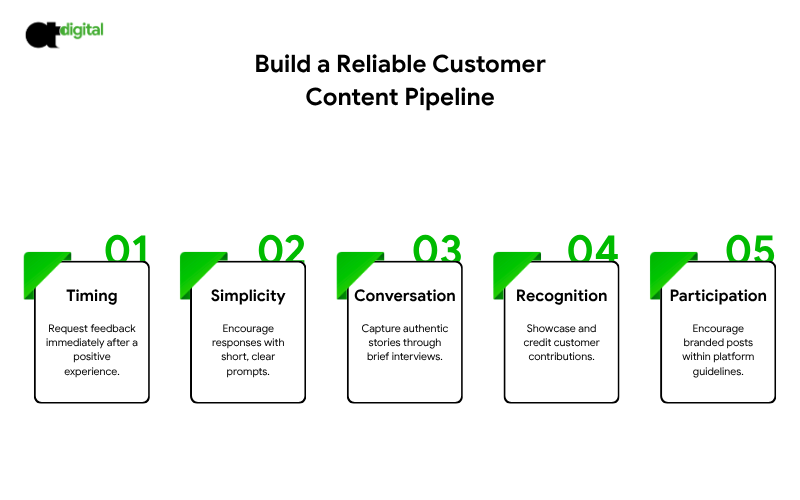
    How to Get More UGC: A System, Not a Hope

    Ask at the Moment of Success

    Most owners assume happy customers will review or post on their own. Mostly, they don’t, until asked. The best time to ask is right after you’ve delivered a win, when the customer is happiest.

    Make It a Two-Sentence Task

    Give a short prompt: “In two sentences, what was the problem and what changed?” A concrete starting point beats a blank page, and this doubles as one of the easiest content creation ideas you can repeat monthly.

    Interview, Don’t Just Request

    For B2B clients, a ten-minute recorded conversation produces better content than asking them to write something cold. You get better stories and better quotes with almost the same effort.

    Feature Customers Publicly

    Share and credit their posts. People make more content when they see others being recognized for it.

    Use a Branded Hashtag or Prompt

    This works well for consumer campaigns. Run contests only within each platform’s promotion rules.

    Hiring UGC Creators

    If organic content isn’t enough, you can hire UGC creators to produce testimonial-style content for your ads. This is now common, especially in consumer categories.

    Where to find them: creator marketplaces, agencies specializing in UGC, social platforms, and content creation companies with a creator network. Review portfolios for the style you want before reaching out.

    What to include in the brief:

    • The audience and their main problem
    • Three key points to cover, and any claims to avoid
    • Format, length and platform
    • Whether the creator posts it or only delivers files to you
    • Usage rights: where, for how long, and in what paid contexts

    What to ask before you hire:

    • Can they show past work in your category?
    • Do they understand disclosure requirements?
    • Are usage terms clear in writing?

    Commissioned UGC is legitimate work, but it isn’t the same as a spontaneous customer review, and the difference matters for the rule below.

    The Rules You Cannot Skip

    Get permission first. Reposting a customer’s content is not the same as having the rights to use it in your ads. Get written consent before reuse, especially anything paid.

    Disclose paid relationships. The FTC’s Endorsement Guides, updated in 2023, require a clear and conspicuous disclosure whenever there’s a “material connection” between a brand and the person endorsing it, whether that’s payment, free products or any other benefit. A hashtag buried at the end of a caption isn’t considered adequate. Commissioned UGC used as an ad should be labeled as what it is.

    Never fabricate proof. The FTC’s rule on fake reviews and testimonials, in effect since October 2024, bans buying or selling fake reviews, including AI-generated ones, and allows the agency to seek civil penalties. No invented customers, no fabricated endorsements.

    Be careful with generative AI. Generative AI content creation tools are genuinely useful for editing, captioning, translation and brainstorming. They are not a substitute for a real customer. An AI-generated “customer” testimonial isn’t UGC. It’s the exact thing the FTC’s 2024 rule targets.

    Moderate and respond. UGC is public and sometimes negative. Watching your social media reputation and responding quickly is part of running a UGC program, not a separate task.

    Want a Compliant UGC Program, Not a Legal Headache?

    We build the request system, manage disclosures correctly, and keep your social media reputation clean while it scales.

    Book My UGC Strategy Call →

    How to Test UGC Against Your Polished Ads

    Don’t take our word, or anyone’s, that UGC will outperform your current creative. Test it.

    • Pick one offer and one audience.
    • Run two or three UGC-style ads against your current best polished ad, same budget, same targeting, same landing page.
    • Let it run long enough to gather meaningful data, not just a day or two.
    • Compare cost per lead or acquisition, not just clicks. A cheap click that doesn’t convert isn’t a win.
    • Read the comments. They tell you which objections the content is answering, or missing.

    For B2B, also watch whether sales conversations start with less skepticism once prospects have seen real customer proof.

    A 30-Day UGC Starter Plan

    Week 1: List your ten happiest customers. Draft a simple request and a two-sentence prompt.

    Week 2: Collect three to five testimonials, using short recorded interviews where possible. Get written permission for reuse.

    Week 3: Turn them into short clips, quote graphics and a case study. Publish some organically and use others in a small paid test.

    Week 4: Compare results with your current creative. Keep what works, ask for the next round, and fold the request into your normal customer process.

    The Verdict: Stop Polishing. Start Asking.

    Here’s the uncomfortable math for anyone who’s spent heavily on production: an 88% trust rate for peer recommendations against a low-double-digit trust rate for the best paid formats isn’t a marginal gap. It’s the difference between an ad that gets skipped and a video that gets watched to the end.

    That doesn’t mean throwing out your creative brand. It means your highest-leverage next move probably isn’t a bigger production budget. It’s ten happy customers you haven’t asked yet.

    Somewhere in your customer list right now is a testimonial that would outperform your best-produced ad, and it’s sitting unrequested. Every week you don’t ask is a week your competitor might. Our UGC audit finds the proof you already have, builds the request system to get more of it, and keeps every piece of it compliant. Book it now, and let your customers close the sale your ads can’t.

    See Your Untapped Social Proof

    Engineering-grade analysis. Pure mathematics. Absolute market capture.
    Get My UGC Audit Now →

  • One Video, 20 Assets: The Content Repurposing Workflow That Saves Your Best Expert’s Time

    One Video, 20 Assets: The Content Repurposing Workflow That Saves Your Best Expert’s Time

    Not because they don’t care. Because writing isn’t their job, and every hour they spend drafting LinkedIn posts is an hour not spent closing the deal that actually pays the bills.

    Meanwhile, your content calendar has a hole in it again.

    There’s a better way to run this, and it doesn’t involve nagging your expert for “just one more blog post.” Record one strong conversation, then mine it for everything your channels need. This guide is the practical companion to our pillar guide, The Pre-Sold Prospect, which explains why founder-led authority shortens the sales cycle. Here we cover the mechanics: a repeatable content repurposing workflow, mapped out asset by asset.

    What Is a Content Repurposing Workflow, and How Does One Video Become 20 Assets?

    A content repurposing workflow turns one source recording into many formats for different channels. Record one 20-minute video, then extract: 1 article, 1 podcast, 3 short clips, 5 LinkedIn posts, 1 slide carousel, 3 quote graphics, 2 emails, 1 FAQ page, 1 lead-gen PDF and 1 sales one-pager. That’s 20 assets from 20 minutes of your expert’s time.

    The rest of this guide shows you how to record the source well, extract from it properly, and avoid the one mistake that turns repurposing into an SEO liability.

    Want This Workflow Built for You?

    We handle the extraction, formatting and distribution, so your expert only has to show up for 20 minutes.

    Get My Content Audit →

    Why This Works: The Case for Repurposing Over Constant Creation

    Two numbers explain why this approach is winning right now. Content Marketing Institute research found that 61% of B2B marketers plan to increase their video investment, and Wyzowl’s 2026 State of Video report puts video adoption among businesses at 91%. Everyone agrees video matters. Almost nobody’s founder has time to produce twenty pieces of it a month from scratch.

    Repurposing solves that gap. It works because different buyers consume differently: one reads a long article, another watches a 90-second clip, a third only sees the LinkedIn post before a sales call. Repurposing also respects something researchers keep confirming about attention. Vidyard’s analysis of nearly a million B2B videos found that clips under one minute hit a 65% completion rate, while videos over 20 minutes dropped to just 20%. And that pattern is shaping how B2B content gets made: the average B2B video length has compressed from 168 seconds in 2024 to about 76 seconds in 2026. Your one long source recording is exactly the raw material that trend rewards, once you cut it down.

    There is a limit worth naming honestly: repurposing multiplies whatever you start with. A vague recording produces 20 vague assets. Everything below depends on getting the source right first.

    Step 1: Record One Source Asset With a Real Point of View

    Skip “our company story.” Record your expert answering one question your buyers actually ask: why do most ad accounts leak money? or what should a small firm check before hiring an agency?

    A simple structure, not a script:

    • One core problem your audience recognizes
    • One clear position on how to solve it
    • Three to five key points, each with a specific example, number or story
    • One or two objections, answered directly

    Twenty minutes is enough. Longer recordings are harder to mine, not richer, and the completion-rate data above is exactly why: buyers reward density.

    Step 2: Transcribe and Extract

    Turn the recording into a transcript, then mark what’s reusable:

    • Strong claims that could stand alone as a post
    • Stories and examples that make a point memorable
    • Numbers and frameworks that translate into graphics or checklists
    • Questions and objections that become FAQ entries
    • Quotable sentences, short and self-contained

    This pass is where all 20 assets come from. You’re not rewriting the video; you’re mining it.

    Step 3: Map It Into 20 Assets

    Here’s a working breakdown from one 20-minute video.

    Asset Count Job it does
    Full video 1 Home base on your site and YouTube
    Podcast or audio version 1 Reaches people who listen instead of watch
    Long-form article 1 Captures search traffic, builds authority
    Downloadable checklist or diagnostic PDF 1 Captures leads for your CRM
    Short video clips (under 90 seconds) 3 Social reach and sales follow-up
    LinkedIn text posts 5 Daily visibility with your best ideas
    Slide carousel 1 Skimmable format for LinkedIn
    Quote graphics 3 Fast, shareable reinforcement
    Email newsletter issues 2 Reaches your existing list directly
    FAQ section or page 1 Answers questions for search and sales
    Sales one-pager or follow-up snippet 1 Arms your team before and after calls
    Total 20

    Not every business needs every asset. If your priority is pipeline, prioritize the PDF, clips and one-pager. If it’s search visibility, prioritize the article and FAQ.

    Repurposing Content for Social Media: Adapt, Don’t Copy

    Pasting identical text everywhere is spam with extra steps, not repurposing. Each platform rewards a different shape:

    • LinkedIn: a strong opening line, one idea per post, plain language. Carousels work well for frameworks and checklists.
    • Short-form video: vertical format, captions and a hook in the first three seconds. Cut clips around a single point, and keep them under 90 seconds if you want the completion-rate advantage the data above shows.
    • Email: one idea per issue, written as if to one person, with one clear next step.
    • Blog and site: structured headings, search-friendly wording and internal links.

    Keep the idea, change the shape. Someone who sees you on three platforms should feel reinforced, not repeated.

    Content Repurposing Examples

    A B2B consultancy founder records a 20-minute talk on why ad budgets leak. It becomes an article, five LinkedIn posts, three clips, a “10-point audit” PDF and two emails.

    A law firm partner answers the five questions clients ask most, on camera. Each answer becomes a short clip and an FAQ entry, and the full recording becomes a guide.

    A SaaS company turns a customer webinar into an article, a case study one-pager, a slide carousel and a follow-up email sequence.

    In each case, the expert spends the same 20 minutes. The output multiplies.

    Avoid Content Cannibalisation and Duplicate Content

    This is where repurposing efforts backfire, and it’s worth getting right. Google’s own guidance is reassuring here: there is no duplicate content penalty. Google’s own engineers estimate that roughly 60% of the web is some form of duplicate content, and its systems simply choose one version to show in search results, consolidating ranking signals onto it. The real risk of duplicate content and cannibalisation isn’t punishment: it’s that you lose control of which page shows up, and it’s rarely your best one.

    To keep control:

    • Give each topic one home page. Everything else supports it and links to it.
    • Rewrite, don’t paste. An article built from a transcript should be edited into a proper article. A raw transcript is thin content.
    • Use canonical tags if you republish a piece elsewhere or across multiple URLs. Google treats a canonical tag as a strong hint for which version to index, not a guarantee, so keep your internal links and sitemap pointing at the same URL you want ranked.
    • Target different intentions. If your article covers a broad topic, use the FAQ to capture specific question searches instead of duplicating the article.
    • When republishing elsewhere, use a canonical link if the platform supports it, or publish an adapted version that links back to the original.

    Build a Content Distribution Strategy, Not a Dump

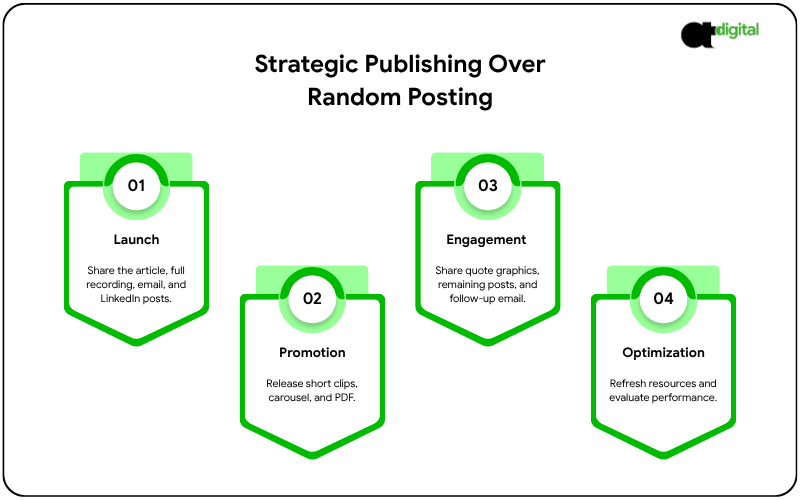
    Twenty assets published in one day is a burst. Spread across a month, it’s a content distribution strategy.

    A simple pattern:

    • Week 1: Publish the article and full video. Send the first email. Post the first LinkedIn text posts.
    • Week 2: Release the short clips and carousel. Share the PDF.
    • Week 3: Post quote graphics and remaining text posts. Send the second email.
    • Week 4: Update the FAQ, refresh the sales one-pager, and review what performed.

    Also keep a simple content marketing distribution checklist for each piece: where it lives, where it’s shared and what links to it internally. Link your clips and posts back to the main article so authority builds in one place, not twenty.

    Ready to Turn One Recording Into a Month of Content?

    We build the extraction map, adapt each asset to its channel, and schedule the rollout, so nothing sits unused in a folder.

    Book My Repurposing Strategy Call →

    Measure What Matters

    Views are easy to count and easy to misread. Track the signals tied to revenue:

    • Which assets lead to booked calls or form fills
    • Which pieces prospects mention in sales conversations
    • Organic traffic and rankings for the main article
    • Downloads and sign-ups from the PDF
    • Whether sales conversations start further along than before

    Then double down on the topics and formats that move real buyers, not just the ones with the highest view count.

    DIY, Hire, or Hybrid?

    You can run this workflow in-house. If you look at content repurposing services, be clear about who does what:

    • Keep with the expert: the source recording and the opinions in it.
    • Delegate: transcription, editing, formatting, scheduling and distribution.
    • Ask any provider: how they preserve the expert’s voice, how they avoid duplicate content, and how they report on results. If your team needs a stronger site foundation for all this content to live on, our website design and development services and content marketing services work together on exactly this.

    Be wary of any service that promises volume without asking what your buyers actually need to know.

    The Verdict: Stop Creating From Scratch. Start Extracting.

    You don’t need more content. You need better use of the expertise you already have sitting in one conversation.

    Here’s the math that makes the case: one 20-minute recording, extracted properly, becomes 20 assets covering search, social, email and sales enablement for an entire month. The alternative, creating 20 separate pieces from scratch, would cost your expert 20 separate interruptions. Repurposing isn’t a shortcut. It’s the only version of this that actually gets done.

    Record one strong source this month. Extract what matters. Adapt it for each channel. Distribute it on a schedule that keeps you visible for four weeks, not four days. Then do it again next month, because the workflow, once built, runs on autopilot.

    Your expert already has the next 20 assets in their head. The only question is whether you extract them this month, or lose another month to a blank content calendar. Our content audit shows exactly which source recording to start with and maps the full 20-asset plan before you record a single minute. Book it now, and stop starting from a blank page.

    Get Your 20-Asset Content Map

    Engineering-grade analysis. Pure mathematics. Zero sales scripts.

    Get My Content Audit Now →