Someone clicks your ad, your email link, or your top Google result, and for three agonizing seconds, nothing happens.
Then the page half-loads, a payment widget throws “this site can’t provide a secure connection,” or they land on a plain white screen reading “There has been a critical error on this website.” They don’t file a support ticket. They don’t tell you what happened. They just leave, and they take their money to whichever competitor’s site actually works.
Here’s the part that should bother you most: you’ll probably never know it happened. No alert fires. No one on your team sees the error. It just shows up, weeks later, as a conversion rate that’s quietly worse than it should be, with no obvious cause. You can write the most persuasive content in your industry and still lose that sale, because content was never the problem. The technical foundation underneath it was. This guide walks through exactly what breaks, what it costs you, and how a proper technical SEO audit catches it before a customer does. It’s the practical companion to our pillar guide, Paid Ads Buy Speed, SEO Buys Wealth, which explains why technical health is commercial infrastructure, not an IT ticket.
What Is a Technical SEO Audit, and Why Does Broken Code Lose You Customers?
A technical SEO audit is a systematic check of your server responses, crawlability, speed and security, the layer beneath your content. Broken code loses customers because errors like server failures, expired SSL certificates and dead links stop a sale mid-click, and they tell Google your site can’t be trusted, quietly eroding the rankings your content earned.
The rest of this guide breaks down exactly what to check, in plain language, starting with the errors most likely to be costing you money right now.
Is Your Site Quietly Losing Customers?
We run a full technical audit of your server responses, crawl errors, security and speed, then show you exactly what’s broken.
The Error Library: What Each Broken Page Is Actually Costing You
Not all errors are equal. Some are rare and catastrophic. Others happen quietly, every day, to a small slice of your visitors, which makes them easy to ignore and expensive to leave unfixed. Here’s what’s actually hiding in your logs right now.
Server Errors (500, 502, 503, 504): When Your Site Just Doesn’t Answer
These are the ones that stop a sale cold, because the problem isn’t your page, it’s your server’s ability to respond at all.
- 500 internal server error and HTTP error 500 mean your server hit a problem it couldn’t identify. Usually a plugin conflict, a corrupted file or a misconfigured script.
- 503 service unavailable means your server is temporarily overloaded or down for maintenance. If this fires during a traffic spike from a successful ad campaign, you’re literally paying to send customers to a wall.
- 504 error (gateway timeout) means one server waited too long for another server to respond, common with slow databases or overloaded hosting.
- Error establishing a database connection is WordPress’s specific version of the same problem: your site’s content lives in a database, and when the connection fails, there’s nothing left to show visitors.
Per the official HTTP status code documentation on MDN Web Docs, every one of these is a 5xx-class response, meaning the server itself acknowledges it failed. Google’s crawler reads that signal too, and repeated server errors are explicitly one of the things that cause Google to scale back how often it crawls your site, which slows down how fast new content and fixes get noticed.
The Trust Killer: “Your Connection Is Not Private” and SSL Errors
Your connection is not private and this site can’t provide a secure connection are two of the most damaging errors on this list, because they don’t just fail quietly, they actively warn the visitor away. Modern browsers show a full-page red warning before anyone can even reach your content, no small banner to miss, no way to pretend it didn’t happen. These almost always trace back to an expired or misconfigured SSL certificate, the small file that enables HTTPS and tells browsers your connection is encrypted.
There’s no soft version of this error. A visitor who sees it either clicks through a scary warning (most won’t) or leaves immediately, and Google has used HTTPS as a baseline ranking signal for years. An expired certificate doesn’t just cost you the visitor standing in front of it. It costs you every visitor for as long as it stays expired.
Dead Ends: 404 Pages, Redirect Loops and Orphan Pages
- Page not found (404) errors happen when a page has moved, been deleted, or was never there. One or two are normal. Dozens, especially on pages that used to rank, mean you’re quietly bleeding the authority those pages built.
- ERR_TOO_MANY_REDIRECTS happens when redirect rules point back at each other in a loop, often after a site migration, an SSL setup gone wrong, or a plugin conflict. The browser gives up and the page never loads at all.
Both are classic “dead end” problems: if Googlebot hits one repeatedly, it stops exploring that part of your site, and if a human hits one, they don’t wait around to find out why
The WordPress-Specific Nightmare: Critical Errors
If you run WordPress, you’ve likely seen (or will see) “There has been a critical error on this website”, WordPress’s generic failure message when a plugin, theme or core file breaks. It’s informational enough for you but tells visitors nothing, and it takes down the entire site, not just one page, until someone manually diagnoses which plugin caused it. One incompatible update, pushed automatically at 3am, and your entire storefront goes dark until someone notices.
Why These Errors Are an SEO Problem, Not Just an IT Problem
Here’s the shift in thinking that matters most: these aren’t maintenance tickets to file and forget. They’re the technical foundation our pillar guide calls commercial infrastructure, and they fail in two directions at once.
On the human side, every error above interrupts a purchase decision at the worst possible moment: right after someone clicked, meaning right after you paid for that click or earned that ranking.
On the algorithm side, Google’s crawler experiences your site the same way a frustrated visitor does. A server that frequently throws 5xx errors gets crawled less often and less deeply. Pages it can’t reach can’t be indexed. Pages it doesn’t trust rank lower, even if the content on them is excellent. This is precisely why a one-time content push without fixing the infrastructure underneath it rarely moves the needle the way businesses expect. You can’t out-write a 503 error.
How Many Errors Is Your Site Actually Throwing?
Most owners have no idea. We check your server logs, crawl reports and security status, and hand you a prioritized fix list.
What a Technical SEO Audit Actually Checks
A real technical audit, not a 20-minute automated scan, goes through the layers in order:
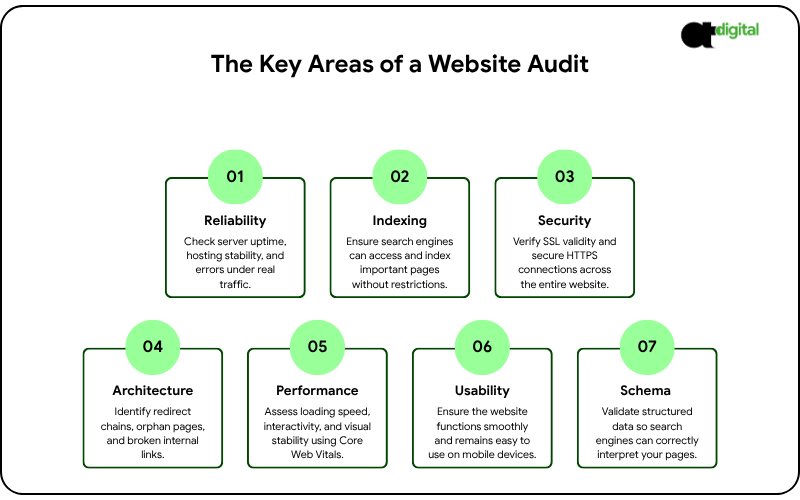
- Server response and uptime. Is your hosting reliable, and how often do you throw 5xx errors under real traffic?
- Crawlability and indexability. Can Googlebot actually reach your important pages? Are any accidentally blocked by robots.txt or a stray noindex tag?
- Security. Is your SSL certificate valid and auto-renewing? Is the whole site served over HTTPS, not just the homepage?
- Site architecture. Are there redirect chains, orphan pages, or broken internal links creating dead ends?
- Core Web Vitals and speed. Does your site meet Google’s loading, interactivity and stability thresholds? (We go deep on this in our dedicated guide to page speed and the three-second rule.)
- Mobile usability. Does the site actually work on a phone, not just resize to fit one?
- Structured data. Is your schema markup valid, so Google can understand what each page actually is?
This is the full scope behind a proper seo audit service, and it’s different from the automated “SEO audit report sample” tools generated in sixty seconds. Those tools are useful for a first pass. They don’t diagnose why your 503 errors spike every Tuesday at 2pm, or why your redirect chain is three hops deep.
A Quick Self-Check: Run This Before You Call Anyone
You don’t need an agency to catch the obvious problems. Use this as a basic SEO audit template you can run in under an hour:
- Check Google Search Console’s Coverage and Core Web Vitals reports for a list of crawl errors and page experience issues Google has already flagged.
- Run your homepage and top three pages through PageSpeed Insights to check your real-world loading speed.
- Click through your main navigation and top 10 landing pages manually, looking for 404s and broken links.
- Check your SSL certificate’s expiration date in your browser’s padlock icon, and confirm it’s set to auto-renew.
- Search Google for site:yourdomain.com and scan the results for anything that looks wrong, duplicated, or outdated.
If this surfaces more than a handful of issues, or if you don’t have the technical background to interpret what Search Console is telling you, that’s the point where technical SEO audits need someone who can actually fix what they find, not just list it. Our B2B SEO services include full technical audits as standard, and where the fix requires development work rather than configuration, our custom web development services team handles it directly instead of handing you a PDF and a separate invoice.
Website Maintenance Services: Why a One-Time Fix Doesn’t Last
Here’s an uncomfortable truth: fixing every error on this list today doesn’t mean you’re fixed in six months. Plugins update, themes conflict, certificates expire, and hosting environments degrade. This is exactly why website maintenance services exist as an ongoing category, not a one-time project.
A proper website maintenance company should be handling, continuously:
- Uptime monitoring that alerts someone the moment a 500 or 503 error starts firing, not when a customer complains
- SSL certificate renewal, tracked and automated, so “your connection is not private” never happens unannounced
- Plugin, theme and core software updates, applied on a schedule and tested, not left to accumulate until something breaks
- Regular backups, so a critical error is a five-minute restore instead of a multi-day rebuild
- Monthly crawl and broken-link checks, catching new 404s before they compound
If you’re comparing web maintenance services, the question to ask isn’t “what does this cost per month.” It’s “what does one hour of my site being down cost me.” Industry downtime-cost research, including data compiled by business.com from provider benchmarks, puts small business downtime losses somewhere between roughly $127 and $427 per minute once you account for lost sales and the staff time spent diagnosing the problem. A single unmonitored outage can cost more than a year of proper maintenance.
Tired of Finding Out About Outages From Customers?
We monitor uptime, SSL and crawl health around the clock, so your team hears about a problem before a customer does, not after.
The Real Cost: A Worked Example
Meet Elena. She runs a mid-size B2B SaaS company, and her site pulls in 500 visitors a day from a mix of organic search and paid ads, converting at 2%, or 10 customers a day at an average contract value of $150. That’s $1,500 a day in revenue through that traffic, roughly $45,000 a month, running quietly in the background while her team focuses on product and sales.
One Tuesday, a routine plugin update conflicts with her hosting environment. For 90 minutes during her peak afternoon traffic window, the site throws intermittent 503 errors, hitting roughly 15% of visitors before anyone notices and restarts the server. That’s about 75 people who hit a wall instead of her pricing page, at her 2% conversion rate, roughly 1.5 lost customers and $225 in revenue, gone in an hour and a half.
Here’s the part that should really worry Elena: nothing in her dashboard flags this as an incident. No big red crash, no support tickets, nothing. Just a conversion rate that’s a little worse than usual that day, easy to write off as noise. This is illustrative math, not a guarantee, but it shows the mechanism exactly: these errors don’t show up as a dramatic crash in your reporting. They show up as a number that’s just slightly worse than it should be, month after month, which is exactly why most businesses never catch them without a dedicated audit.
DIY Audit vs. Professional SEO Audit Service: How to Decide
| Your situation | Your move |
|---|---|
| Small site, no recent errors found in Search Console | Run the self-check above quarterly |
| Multiple crawl errors, slow pages, or an expired-feeling site | Get a full technical SEO audit |
| Errors keep recurring after you fix them | You need ongoing website maintenance, not another one-time fix |
| Running paid ads or heavy organic traffic to a site with known issues | Fix this before spending another dollar on acquisition |
Sending paid traffic or ranking content to a technically broken site is the digital equivalent of a brilliant salesperson with a stutter and a bad phone line. The message might be perfect. The customer never hears it.
The Verdict: Fix the Foundation Before You Build Higher
Your website isn’t a brochure. It’s a software application made of code, and code breaks. The question was never whether something would eventually fail, a certificate expiring, a plugin conflicting, a server buckling under a traffic spike. The question is whether you catch it before a customer does, or after, from a quietly disappointing month you can’t quite explain.
If your site is throwing any of the errors in this guide right now, the fix is usually hours, not weeks, and it’s almost always cheaper than the traffic you’re already paying to send there. If it isn’t, and you genuinely don’t know, that uncertainty is itself the answer: a healthy site doesn’t leave you guessing.
Your content, your ads and your rankings are only as strong as the infrastructure underneath them. Our technical SEO audit checks every layer in this guide against your actual site, right now, and tells you exactly what’s costing you customers and in what order to fix it. Book it before your next ad dollar or content push goes to a page that might not even load.
Get Your Technical SEO Audit
Engineering-grade infrastructure analysis. Pure strategy. No sales scripts.