
Somewhere right now, someone is searching for exactly what your business sells, they land on your site, and they leave before it even finishes loading.
You’ll never see them in your analytics as a lost sale. You’ll just see a slightly lower conversion rate than you expected, month after month, with no obvious cause.
That’s the 3-second rule at work, and it’s the most expensive invisible problem in small business marketing. This guide explains what the rule actually means, how to measure where you stand, and exactly which fixes to make first. It builds on our pillar guide, The Silent Closer. If you’d rather have this handled for you, see our website design and development services.
What Is the 3-Second Rule for Website Speed?
The 3-second rule says most visitors abandon a page that takes longer than 3 seconds to load. Google’s 2016 mobile research found 53% of mobile visits were abandoned past that threshold, and half of users expect a page to load in under 2 seconds.
The rest of this guide shows you how to test your own pages against that threshold, and exactly what to fix first.
How Fast Is Your Site Actually Loading?
We test your key pages on real mobile connections and show you exactly what’s costing you visitors.
Where the 3-Second Rule Comes From
The rule traces back to Google’s 2016 study, “The Need for Mobile Speed,” which analyzed more than 10,000 mobile web domains and found that 53% of mobile visits were abandoned when pages took longer than three seconds to load, with the average mobile site at the time taking 19 seconds on 3G connections. That data is now several years old, and connection speeds and expectations have shifted since, but the core principle hasn’t: people don’t wait, and mobile users wait even less than desktop ones.
Treat three seconds as a warning line, not a magic threshold. A page that loads in 2.9 seconds isn’t safe, and one that loads in 3.1 isn’t doomed. Speed is a gradient, and every improvement helps, with the largest gains showing up on your key conversion pages.
Google now measures real-world experience through Core Web Vitals. These are the targets to aim for:
| Metric | What it measures | “Good” target |
|---|---|---|
| Largest Contentful Paint (LCP) | How fast the main content appears | 2.5 seconds or less |
| Interaction to Next Paint (INP) | How quickly the page responds to taps and clicks | 200 milliseconds or less |
| Cumulative Layout Shift (CLS) | How much the page jumps around while loading | 0.1 or less |
These are assessed on real visitor data, so a fast result on your own office Wi-Fi doesn’t guarantee a pass on a customer’s phone.
Where the 3-Second Rule Comes From
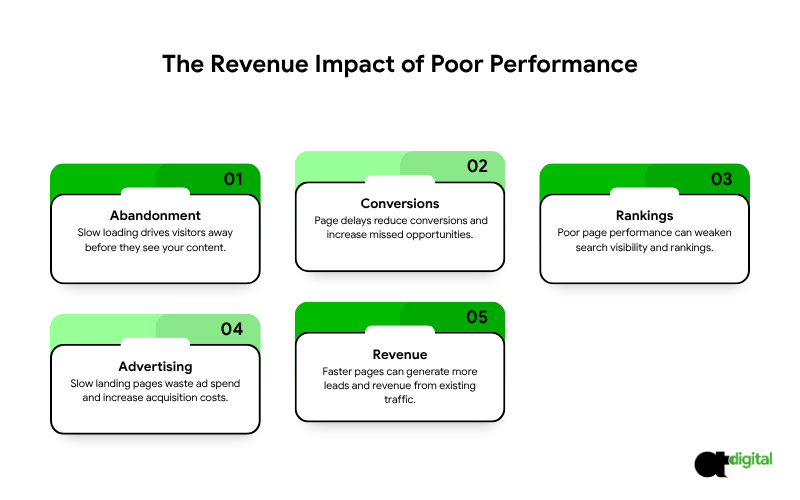
Lost visitors, before they see anything. The longer a page takes, the more people leave before your content even renders. That’s not a bounce from disinterest; it’s a bounce from impatience, and it’s the most preventable kind you’ll ever face.
Lost conversions, at a scale that compounds. Akamai’s 2017 analysis of 10 billion retail website visits found that a delay of just 100 milliseconds, one-tenth of a second, was associated with a 7% drop in conversion rate. Read that again: not a 3-second delay. A tenth of a second. If your key pages are running 2 or 3 seconds slower than they should be, the compounding effect on conversions is not small.
Weaker search visibility. Page experience, including Core Web Vitals, is one of many ranking signals Google uses. Great content and relevance matter more, but between two similarly relevant pages, the faster one has a real edge.
More expensive ads. If you send paid traffic to slow landing pages, you’re paying for clicks that leave before converting. Landing page experience also feeds into Google Ads Quality Score, which directly affects what you pay per click. If your ad spend and your site speed aren’t working together, see our PPC management services alongside the fixes below.
A concrete example. Suppose your site gets 10,000 visitors a month and converts 2% into leads, or 200 leads. If speed improvements lift that to 2.4%, a realistic gain from fixing the issues below, that’s 240 leads from the exact same traffic. At a lead value of $100, that’s an extra $4,000 a month, without spending a dollar more on marketing. This is illustrative math, not a guarantee, but it shows the shape of the opportunity: speed fixes are one of the few improvements that pay you back in the traffic you already have.
How to Measure Your Website Speed
Don’t guess. Test.
Use PageSpeed Insights. Enter a URL and choose the mobile tab. It shows two kinds of data: field data from real Chrome users, and lab data from a simulated test. Prioritize the field data when it’s available, since that’s what real visitors actually experience, not a simulation.
Check Google Search Console. The Core Web Vitals report groups your pages into good, needs improvement and poor, so you can spot patterns across the whole site at once.
Test more than your homepage. Check your top service pages, landing pages, contact page and checkout. Those are the pages where speed directly converts into revenue.
Test on mobile and on a slower connection. Most of your visitors aren’t on office fiber. Tools like WebPageTest let you simulate real-world conditions.
Record your baseline before changing anything, so you can actually prove the improvement afterward.
What Usually Makes Pages Slow
If your site has very slow loading web pages, the cause is usually one or more of these:
- Oversized images uploaded straight from a camera or design tool
- Too many scripts, especially third-party ones like chat widgets, trackers and social feeds
- Cheap or overloaded hosting with no caching
- Heavy themes and page builders that load code the page never actually uses
- Render-blocking CSS and JavaScript that delays the first paint
- Unoptimized fonts and too many font families
- Auto-playing video in the hero section
- Layout shift from banners, ads and images without set dimensions
Web Performance Optimization Techniques: The Priority List
Work in this order. The first items usually deliver the biggest gains for the least effort.
- Optimize images. Compress them, use modern formats like WebP or AVIF, size them to the space they occupy, and lazy-load images below the fold. Don’t lazy-load the main image at the top of the page, since that delays your LCP score directly.
- Improve hosting and caching. Use reliable hosting, enable page caching, and add a content delivery network so files load from a server physically near the visitor.
- Cut and defer scripts. Audit every third-party tag. Remove what you don’t use, and delay what isn’t needed at first load.
- Streamline CSS and JavaScript. Minify files, remove unused code, and avoid render-blocking resources.
- Fix fonts. Limit font families and weights, and make text visible while fonts load rather than invisible.
- Prevent layout shift. Set width and height on images, and reserve space for banners and embeds before they load.
- Re-measure after each change. Confirm every fix actually helps, and that nothing else breaks in the process.
Want These Fixes Made Without the DIY Risk?
We optimize your images, hosting, scripts and code, then re-test until you pass Core Web Vitals, without breaking your forms or tracking.
WordPress: How to Improve Site Speed
Many small business sites run on WordPress, and it can be fast when configured well. A WordPress improve site speed checklist:
- Choose quality hosting and keep PHP up to date
- Install one reputable caching solution, not several that conflict with each other
- Compress and resize images automatically on upload
- Delete unused plugins and themes, and replace heavy plugins with lighter alternatives
- Use a lightweight theme, and avoid loading a page builder’s full library on simple pages
- Add a CDN
- Clean the database periodically
A fair note: custom-coded sites can be leaner, but a well-maintained WordPress site is fast enough for most businesses. Discipline matters more than the platform underneath it.
Website Speed for Small Business: Start With the Free Wins
You don’t need a big budget to see meaningful improvement. A sensible order:
Week 1: Measure your key pages and record the baseline. Week 2: Compress images and enable caching. Week 3: Remove unused plugins and scripts, and fix layout shift. Week 4: Retest, compare, and decide whether the remaining gap justifies professional help.
Often, the first two weeks deliver the largest visible gains, before you’ve spent a cent on outside help.
Fast-Loading Website Design Starts With Design, Not Just Code
Speed isn’t only a developer’s job. Design choices decide how much a page has to load in the first place:
- Skip autoplay hero videos and heavy sliders unless they genuinely earn their weight
- Use a small, consistent number of fonts and image sizes
- Keep the first screen simple and focused on one message
- Agree a performance budget before design starts, such as a maximum page weight and an LCP target
A beautiful page that loads in six seconds is not beautiful to the 53% of mobile visitors who already left after three.
When to Hire Website Speed Optimization Services
You can handle the basics yourself. Consider professional website speed optimization services if:
- You’ve done the basics and still fail Core Web Vitals in field data
- Your site is heavily built with page builders or custom functionality
- You run an online store, where speed affects revenue directly, not just experience
- You need fixes made safely without breaking layout, forms or tracking
A good page speed optimization service should:
- Measure before and after using real-user field data, not just a lab score
- Prioritize fixes by expected impact, not by whichever is easiest to bill
- Explain what was changed and why
- Protect functionality, including forms, tracking and checkout
Be cautious of anyone who guarantees a perfect 100 score. A perfect score isn’t the goal. Passing Core Web Vitals and improving real conversions is.
The Verdict: Fix Your Fastest-Leaking Page First
Here’s the math that should drive your priorities: a 100-millisecond delay costs roughly 7% in conversions, and 53% of mobile visitors abandon anything past three seconds. If your key landing page is running even two seconds slower than it should, you’re not looking at a minor optimization opportunity. You’re looking at a leak that’s costing you real revenue every single day it goes unfixed.
You don’t need to fix your entire site at once. You need to fix the one page that costs you the most: your best-converting landing page, your top service page, or your checkout. Measure it today, fix the biggest issue this week, and re-measure. The $4,000-a-month example above isn’t a hypothetical for every business, but it’s the right shape of thinking: speed fixes pay you back in the traffic you’re already paying to attract.
Every day your site stays slow, you’re paying for clicks and rankings that a faster competitor converts and you don’t. Our speed audit tests your key pages on real mobile connections right now and tells you exactly what to fix first, in the order that gets you the fastest return. Book it today, and stop losing visitors before they even see what you offer.
Stop Losing Visitors Before They See Your Site
Engineering-grade friction analysis. Pure mathematics. Zero sales scripts.