Build Your Growth Stack

Confirm or adjust your services and enter your details.

Please select at least one service.
First name is required.
Last name is required.
Please enter a valid email address.

Tag: conversion rate optimization

  • The Landing Page Trap: How a Bad Page Turns Your Best Ad Into a Wasted Click

    The Landing Page Trap: How a Bad Page Turns Your Best Ad Into a Wasted Click

    Then the visitor lands, and they bounce in four seconds flat. Not because your ad lied. Because the page it sent them to had nothing to do with what they just clicked.

    This is the landing page trap, and it’s one of the most expensive, least-diagnosed leaks in paid advertising. Agencies love to report on impressions and click-through rate because those numbers almost always look good. What they rarely show you is the page those clicks landed on, and whether it was built to close or just built to exist. This guide shows you exactly what separates a page that converts from one that quietly burns your ad budget. It’s the practical companion to our pillar guide, The Ad Waste Audit, which covers the full system behind wasted spend.

    What Is the Landing Page Trap, and Why Do Great Ads Fail on Bad Pages?

    The landing page trap is sending paid traffic to a generic page instead of a dedicated one built for that exact ad. A visitor who clicks a specific offer expects a page that continues that exact message. Send them to your homepage instead, and they have to hunt for what they came for, so most just leave.

    The rest of this guide breaks down exactly what a page needs to finish that job, and how to know if yours is failing.

    Is Your Landing Page Losing the Clicks You’re Paying For?

    We audit your current landing pages against message match, load time and conversion best practices, and show you exactly what’s costing you.

    Get My Landing Page Audit →

    The Homepage Mistake: Why “Just Send Them to Our Site” Fails

    Here’s the scenario that plays out thousands of times a day. Meridian Cybersecurity runs an ad for “Enterprise Cybersecurity Audits.” It’s a good ad, tightly targeted at IT directors with real budget authority, and it’s getting clicks. But every one of those clicks lands on Meridian’s homepage: a navigation bar, a mission statement, a careers link, and a generic “Our Services” dropdown somewhere in the mix. The visitor has a singular, high-urgency intent, and the homepage is answering a completely different question.

    Your homepage is built to orient a stranger to your whole business. A landing page is built to finish one specific conversation your ad already started. Conflating the two is the single most common reason conversion rate optimization best practices always start with the same instruction: never send paid traffic to your homepage. Meridian’s conversion rate on that campaign was sitting at 1.8%, well below what the keyword’s intent should have produced, and the team had no idea why until someone checked where the clicks were actually landing.

    Anatomy of a High-Converting Landing Page

    So what does a page that actually finishes the job look like? The anatomy of a landing page that converts comes down to a short list of non-negotiables, not clever design tricks.

    Message Match: The Rule Most Pages Break

    If your ad promises “Free 2026 Tax Planning Guide,” your headline needs to deliver exactly that, in roughly the same words, the instant the page loads. Any gap between what the ad promised and what the headline says creates a half-second of doubt, and doubt is where bounces come from. This single fix, matching your headline to your ad copy word for word, is consistently one of the highest-leverage changes you can make to landing pages that convert, and it’s a core finding behind the Nielsen Norman Group’s usability research on why visitors judge a page’s relevance within seconds of arrival.

    One Goal, One Page, No Exit Ramps

    A high converting landing page asks for exactly one action. Not “call us, download this, or follow us on social,” three competing calls to action that each dilute the others. Pick the single next step you want, and remove everything that offers an alternative path, including your main site navigation. Every link you leave on the page is an exit ramp away from the conversion you paid for.

    Bounce Rate vs. Exit Rate: What These Numbers Are Actually Telling You

    Before you can fix a landing page, you need to read its numbers correctly, and this is where most people mix up two different metrics.

    What is the bounce rate in SEO and analytics terms? It’s the percentage of visitors who land on a page and leave without taking any further action, viewing no other page, clicking nothing. For a landing page, a high bounce rate usually means a message match or relevance problem: people arrived expecting something the page didn’t deliver.

    Exit rate vs. bounce rate is the distinction worth knowing: exit rate measures how often a page is the last one in a session, regardless of how many pages the visitor viewed before that. A high exit rate on your “thank you” confirmation page is normal and expected. A high bounce rate on your landing page is a warning sign.

    What counts as a concerning number? There’s no single universal bounce rate benchmark or landing page bounce rate benchmark that applies everywhere, it varies by industry and traffic source, but a landing page bouncing well above 60-70% on paid traffic is usually telling you something is broken in message match, load speed, or mobile usability, not that your offer is bad. Meridian’s homepage, for what it’s worth, was bouncing paid visitors at 74%.

    How to improve bounce rate (and how to reduce bounce rate) on a paid landing page, in priority order:

    1. Fix message match between ad and headline first. This is almost always the biggest lever.
    2. Check your mobile experience specifically, since most paid traffic arrives on phones.
    3. Cut your page load time. Every extra second of waiting pushes more visitors to leave before they see anything.
    4. Remove navigation links and competing calls to action.

    Is Your Bounce Rate Telling You Something?

    We diagnose exactly why visitors are leaving, message match, speed or mobile friction, instead of guessing at a redesign.

    Diagnose My Bounce Rate →

    Conversion Rate Optimization Best Practices: The CPA Multiplier

    Our pillar guide makes a specific claim worth putting real numbers against: that lifting a landing page’s conversion rate from 2% to 4% cuts your cost per acquisition in half, without spending another dollar on ads. That math is simply true, and it’s why conversion rate optimization is often the highest-leverage lever available to a business already running ads, more reliable than trying to find cheaper clicks.

    For context on what you’re actually working against, Unbounce’s Conversion Benchmark Report, drawn from 57 million conversions across more than 41,000 landing pages, puts the median landing page conversion rate at 6.6% across all industries, though it varies sharply by sector: financial services pages convert at a median of 8.4%, while SaaS pages trail at 3.8%. If your page is sitting well below your industry’s median, that gap is where your CPA is quietly bleeding out.

    Here’s what that gap looked like for Meridian once the team built a dedicated page, matched the headline to the ad word for word, and stripped the navigation: conversion rate went from 1.8% to 5.1% on the same ad spend, same targeting, same bids. Same dollars in, nearly three times the qualified leads out.

    To increase website conversion rate and improve website conversion rate on a specific page, work through these in order of typical impact:

    • Tighten message match (covered above)
    • Shorten your form to the fewest fields that still qualify the lead
    • Add a single, clear, risk-reducing proof point (a guarantee, a specific result, a credible number)
    • Make your one call-to-action impossible to miss above the fold
    • Fix load speed, especially on mobile

    PPC Landing Pages vs. SEO Landing Pages: Do They Need to Be Different?

    Yes, and understanding why changes how you build each one.

    PPC landing page optimization and pages built for landing pages for Google ads specifically are built for one audience arriving in one mindset, often with a time-limited offer, and they’re allowed to be aggressively narrow and single-purpose, since every visitor arrives via the exact ad you control.

    Do landing pages help SEO? Generally, not much, and that’s by design. A true PPC landing page is usually set to no index, stripped of navigation, and built purely for conversion, none of which helps organic rankings. Google’s own guidance on thin content favors substantial, people-first pages for ranking purposes, which a tightly stripped PPC page deliberately isn’t built to be. If you want a page to rank organically, it needs internal links, broader on-page SEO structure, and content depth, elements that actively work against a tight, single-purpose PPC page. Trying to make one page serve both jobs well is how you end up with a page that does neither.

    Want a Page Built to Convert, Not Just Exist?

    We design, build and test dedicated landing pages matched to each campaign, so your ad spend doesn’t leak out through a generic page.

    Book My Landing Page Build →

    How to Test and Improve: A/B Testing, Tools and Analytics

    You shouldn’t be guessing which version of a page performs better. Landing page testing, specifically A/B testing for landing pages, is how you replace opinion with data.

    The basics of landing page split testing:

    • Test one variable at a time, a headline, a CTA button, a hero image, not a full redesign all at once, or you won’t know which change actually moved the needle.
    • Run the test long enough to reach a meaningful sample size before declaring a winner.
    • Start with the elements most likely to move conversion: headline and message match first, form length second, visual proof third.

    For landing page analytics and landing page analysis, track beyond the raw conversion rate: time on page, scroll depth, and where in the page people stop engaging all tell you where attention is being lost. Most major landing page optimization tools (your ad platform’s own landing page reports, your analytics suite, and dedicated page builders with built-in testing) surface these metrics without custom development.

    Dynamic landing pages, pages that automatically swap headlines or offer text to match the specific ad, keyword or audience that sent the visitor, take message match from a one-time fix to a systemized one. They’re worth the setup once you’re running more than a handful of campaigns at once, since manually building a unique page per ad doesn’t scale.

    Landing Page Copywriting: Say the One Thing They Came For

    Good landing page copywriting isn’t about clever lines. It’s about ruthless clarity. The visitor arrived with one question in mind, “can this solve my specific problem,” and every sentence on the page should move them closer to a confident yes.

    A simple structure that holds up across industries:

    1. Headline: restates exactly what the ad promised.
    2. Subheadline: adds the one detail that makes the offer credible (a number, a timeframe, a guarantee).
    3. Three to five benefit points: what changes for them, not a list of your features.
    4. One proof element: a testimonial, a stat, a case result.
    5. One call to action, repeated at the top and bottom of the page, worded identically both times.

    Cut anything that doesn’t serve one of those five jobs. A landing page is not the place for your company history.

    Common Landing Page Mistakes (That Are Easy to Fix)

    The recurring list of landing page mistakes we see most often, roughly in order of how much damage they do:
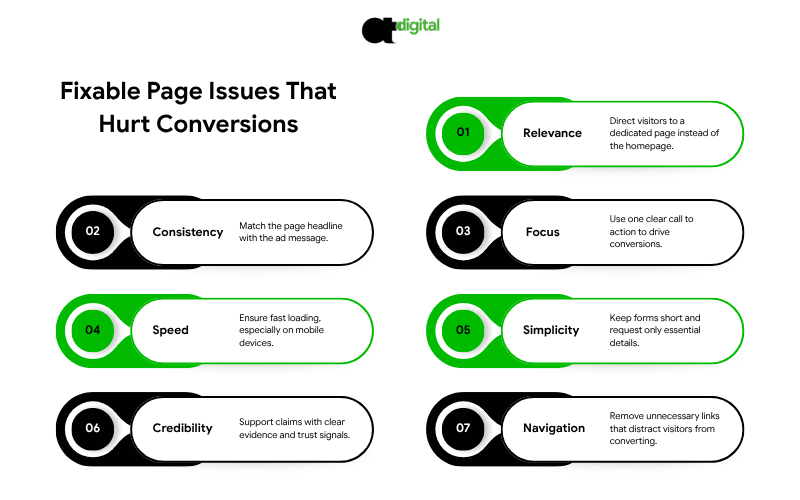
    • Sending traffic to the homepage instead of a dedicated page.
    • The headline doesn’t match the ad that drove the click.
    • Multiple competing calls to action diluting the one conversion you actually want.
    • Slow load time, especially on mobile, where most paid traffic lands first.
    • Forms with too many fields, asking for information you don’t actually need yet.
    • No proof element, nothing specific backing up the claim being made.
    • Full site navigation left in place, giving visitors an easy way to wander off before converting.

    Most pages have two or three of these at once, which compounds the damage rather than adding to it. Meridian had four.

    DIY vs. Hiring a Landing Page Optimization Agency

    You can fix the basics above yourself with a page builder and some discipline. Consider bringing in a landing page optimization agency, landing page optimization company, or an independent landing page optimization expert when:

    • You’re running multiple simultaneous campaigns and need dedicated pages for each, fast
    • You’ve fixed the obvious issues and conversion is still below your industry benchmark
    • You need proper A/B testing infrastructure, not guesswork
    • Your team doesn’t have the design or copywriting bandwidth to iterate quickly

    If you’re comparing landing page optimization services, ask any landing page optimizer you’re evaluating three things before signing: how they’ll measure success (conversion rate and cost per acquisition, not just “engagement”), whether they build dedicated pages per campaign or one reusable template, and how quickly they can turn around a new page when you launch a new ad. For a team that handles the ad account and the landing pages it feeds as one connected system, see our PPC management services.

    The Verdict: Your Ad Already Did the Hard Part

    Here’s the frustrating truth about the landing page trap: by the time a visitor clicks your ad, the expensive work is already done. You paid for the click, won the auction, and earned their attention for a few seconds. A broken landing page throws all of that away in the final step, the one that should have been the easiest to control.

    Meridian’s fix took a few weeks to build and test. It didn’t touch targeting, didn’t touch bids, didn’t add a dollar to the budget. It took the same traffic they were already paying for and nearly tripled what it produced. That’s the entire case for fixing this before anything else: run the math on your own numbers, and if lifting your conversion rate from 2% to 4% cuts your cost per acquisition in half, every dollar spent fixing the landing page makes every future ad dollar worth twice as much. Compare that to chasing cheaper clicks, which only ever buys you the same conversion rate at a slightly lower price.

    You don’t need a bigger ad budget to fix this. You need the page at the end of the click to finish the conversation your ad started. Our landing page audit checks your message match, load speed, mobile experience and form friction against what your industry actually converts at, and tells you exactly where your current pages are leaking budget. Book it before your next campaign sends another round of paid clicks to a page that isn’t ready for them.

    Stop Paying for Clicks Your Page Can’t Convert

    Engineering-grade account analysis. Pure mathematics. Zero sales scripts.
    Initiate My Forensic Ad Audit →

  • The Error Nobody Sees: What a Technical SEO Audit Catches Before Broken Code Costs You the Sale

    The Error Nobody Sees: What a Technical SEO Audit Catches Before Broken Code Costs You the Sale

    Then the page half-loads, a payment widget throws “this site can’t provide a secure connection,” or they land on a plain white screen reading “There has been a critical error on this website.” They don’t file a support ticket. They don’t tell you what happened. They just leave, and they take their money to whichever competitor’s site actually works.

    Here’s the part that should bother you most: you’ll probably never know it happened. No alert fires. No one on your team sees the error. It just shows up, weeks later, as a conversion rate that’s quietly worse than it should be, with no obvious cause. You can write the most persuasive content in your industry and still lose that sale, because content was never the problem. The technical foundation underneath it was. This guide walks through exactly what breaks, what it costs you, and how a proper technical SEO audit catches it before a customer does. It’s the practical companion to our pillar guide, Paid Ads Buy Speed, SEO Buys Wealth, which explains why technical health is commercial infrastructure, not an IT ticket.

    What Is a Technical SEO Audit, and Why Does Broken Code Lose You Customers?

    A technical SEO audit is a systematic check of your server responses, crawlability, speed and security, the layer beneath your content. Broken code loses customers because errors like server failures, expired SSL certificates and dead links stop a sale mid-click, and they tell Google your site can’t be trusted, quietly eroding the rankings your content earned.

    The rest of this guide breaks down exactly what to check, in plain language, starting with the errors most likely to be costing you money right now.

    Is Your Site Quietly Losing Customers?

    We run a full technical audit of your server responses, crawl errors, security and speed, then show you exactly what’s broken.

    Get My Technical SEO Audit →

    The Error Library: What Each Broken Page Is Actually Costing You

    Not all errors are equal. Some are rare and catastrophic. Others happen quietly, every day, to a small slice of your visitors, which makes them easy to ignore and expensive to leave unfixed. Here’s what’s actually hiding in your logs right now.

    Server Errors (500, 502, 503, 504): When Your Site Just Doesn’t Answer

    These are the ones that stop a sale cold, because the problem isn’t your page, it’s your server’s ability to respond at all.

    • 500 internal server error and HTTP error 500 mean your server hit a problem it couldn’t identify. Usually a plugin conflict, a corrupted file or a misconfigured script.
    • 503 service unavailable means your server is temporarily overloaded or down for maintenance. If this fires during a traffic spike from a successful ad campaign, you’re literally paying to send customers to a wall.
    • 504 error (gateway timeout) means one server waited too long for another server to respond, common with slow databases or overloaded hosting.
    • Error establishing a database connection is WordPress’s specific version of the same problem: your site’s content lives in a database, and when the connection fails, there’s nothing left to show visitors.

    Per the official HTTP status code documentation on MDN Web Docs, every one of these is a 5xx-class response, meaning the server itself acknowledges it failed. Google’s crawler reads that signal too, and repeated server errors are explicitly one of the things that cause Google to scale back how often it crawls your site, which slows down how fast new content and fixes get noticed.

    The Trust Killer: “Your Connection Is Not Private” and SSL Errors

    Your connection is not private and this site can’t provide a secure connection are two of the most damaging errors on this list, because they don’t just fail quietly, they actively warn the visitor away. Modern browsers show a full-page red warning before anyone can even reach your content, no small banner to miss, no way to pretend it didn’t happen. These almost always trace back to an expired or misconfigured SSL certificate, the small file that enables HTTPS and tells browsers your connection is encrypted.

    There’s no soft version of this error. A visitor who sees it either clicks through a scary warning (most won’t) or leaves immediately, and Google has used HTTPS as a baseline ranking signal for years. An expired certificate doesn’t just cost you the visitor standing in front of it. It costs you every visitor for as long as it stays expired.

    Dead Ends: 404 Pages, Redirect Loops and Orphan Pages

    • Page not found (404) errors happen when a page has moved, been deleted, or was never there. One or two are normal. Dozens, especially on pages that used to rank, mean you’re quietly bleeding the authority those pages built.
    • ERR_TOO_MANY_REDIRECTS happens when redirect rules point back at each other in a loop, often after a site migration, an SSL setup gone wrong, or a plugin conflict. The browser gives up and the page never loads at all.

    Both are classic “dead end” problems: if Googlebot hits one repeatedly, it stops exploring that part of your site, and if a human hits one, they don’t wait around to find out why

    The WordPress-Specific Nightmare: Critical Errors

    If you run WordPress, you’ve likely seen (or will see) “There has been a critical error on this website”, WordPress’s generic failure message when a plugin, theme or core file breaks. It’s informational enough for you but tells visitors nothing, and it takes down the entire site, not just one page, until someone manually diagnoses which plugin caused it. One incompatible update, pushed automatically at 3am, and your entire storefront goes dark until someone notices.

    Why These Errors Are an SEO Problem, Not Just an IT Problem

    Here’s the shift in thinking that matters most: these aren’t maintenance tickets to file and forget. They’re the technical foundation our pillar guide calls commercial infrastructure, and they fail in two directions at once.

    On the human side, every error above interrupts a purchase decision at the worst possible moment: right after someone clicked, meaning right after you paid for that click or earned that ranking.

    On the algorithm side, Google’s crawler experiences your site the same way a frustrated visitor does. A server that frequently throws 5xx errors gets crawled less often and less deeply. Pages it can’t reach can’t be indexed. Pages it doesn’t trust rank lower, even if the content on them is excellent. This is precisely why a one-time content push without fixing the infrastructure underneath it rarely moves the needle the way businesses expect. You can’t out-write a 503 error.

    How Many Errors Is Your Site Actually Throwing?

    Most owners have no idea. We check your server logs, crawl reports and security status, and hand you a prioritized fix list.

    Request My Audit Report →

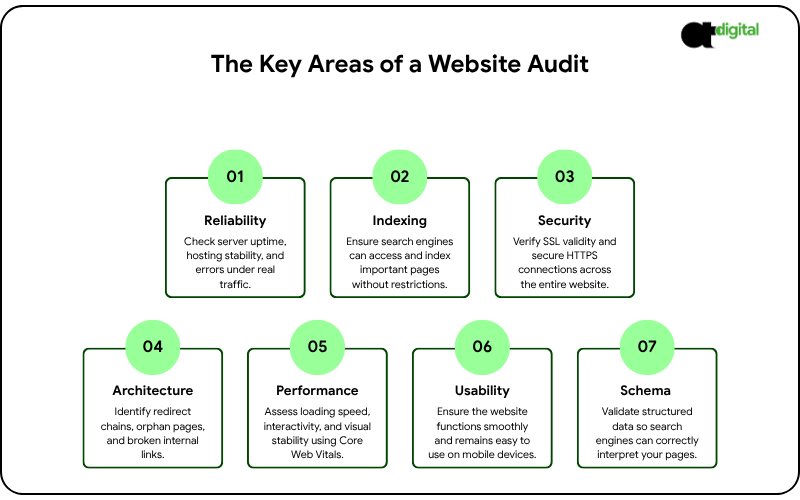
    What a Technical SEO Audit Actually Checks

    A real technical audit, not a 20-minute automated scan, goes through the layers in order:

    • Server response and uptime. Is your hosting reliable, and how often do you throw 5xx errors under real traffic?
    • Crawlability and indexability. Can Googlebot actually reach your important pages? Are any accidentally blocked by robots.txt or a stray noindex tag?
    • Security. Is your SSL certificate valid and auto-renewing? Is the whole site served over HTTPS, not just the homepage?
    • Site architecture. Are there redirect chains, orphan pages, or broken internal links creating dead ends?
    • Core Web Vitals and speed. Does your site meet Google’s loading, interactivity and stability thresholds? (We go deep on this in our dedicated guide to page speed and the three-second rule.)
    • Mobile usability. Does the site actually work on a phone, not just resize to fit one?
    • Structured data. Is your schema markup valid, so Google can understand what each page actually is?

    This is the full scope behind a proper seo audit service, and it’s different from the automated “SEO audit report sample” tools generated in sixty seconds. Those tools are useful for a first pass. They don’t diagnose why your 503 errors spike every Tuesday at 2pm, or why your redirect chain is three hops deep.

    A Quick Self-Check: Run This Before You Call Anyone

    You don’t need an agency to catch the obvious problems. Use this as a basic SEO audit template you can run in under an hour:

    • Check Google Search Console’s Coverage and Core Web Vitals reports for a list of crawl errors and page experience issues Google has already flagged.
    • Run your homepage and top three pages through PageSpeed Insights to check your real-world loading speed.
    • Click through your main navigation and top 10 landing pages manually, looking for 404s and broken links.
    • Check your SSL certificate’s expiration date in your browser’s padlock icon, and confirm it’s set to auto-renew.
    • Search Google for site:yourdomain.com and scan the results for anything that looks wrong, duplicated, or outdated.

    If this surfaces more than a handful of issues, or if you don’t have the technical background to interpret what Search Console is telling you, that’s the point where technical SEO audits need someone who can actually fix what they find, not just list it. Our B2B SEO services include full technical audits as standard, and where the fix requires development work rather than configuration, our custom web development services team handles it directly instead of handing you a PDF and a separate invoice.

    Website Maintenance Services: Why a One-Time Fix Doesn’t Last

    Here’s an uncomfortable truth: fixing every error on this list today doesn’t mean you’re fixed in six months. Plugins update, themes conflict, certificates expire, and hosting environments degrade. This is exactly why website maintenance services exist as an ongoing category, not a one-time project.

    A proper website maintenance company should be handling, continuously:

    • Uptime monitoring that alerts someone the moment a 500 or 503 error starts firing, not when a customer complains
    • SSL certificate renewal, tracked and automated, so “your connection is not private” never happens unannounced
    • Plugin, theme and core software updates, applied on a schedule and tested, not left to accumulate until something breaks
    • Regular backups, so a critical error is a five-minute restore instead of a multi-day rebuild
    • Monthly crawl and broken-link checks, catching new 404s before they compound

    If you’re comparing web maintenance services, the question to ask isn’t “what does this cost per month.” It’s “what does one hour of my site being down cost me.” Industry downtime-cost research, including data compiled by business.com from provider benchmarks, puts small business downtime losses somewhere between roughly $127 and $427 per minute once you account for lost sales and the staff time spent diagnosing the problem. A single unmonitored outage can cost more than a year of proper maintenance.

    Tired of Finding Out About Outages From Customers?

    We monitor uptime, SSL and crawl health around the clock, so your team hears about a problem before a customer does, not after.

    See What Maintenance Should Actually Cover →

    The Real Cost: A Worked Example

    Meet Elena. She runs a mid-size B2B SaaS company, and her site pulls in 500 visitors a day from a mix of organic search and paid ads, converting at 2%, or 10 customers a day at an average contract value of $150. That’s $1,500 a day in revenue through that traffic, roughly $45,000 a month, running quietly in the background while her team focuses on product and sales.

    One Tuesday, a routine plugin update conflicts with her hosting environment. For 90 minutes during her peak afternoon traffic window, the site throws intermittent 503 errors, hitting roughly 15% of visitors before anyone notices and restarts the server. That’s about 75 people who hit a wall instead of her pricing page, at her 2% conversion rate, roughly 1.5 lost customers and $225 in revenue, gone in an hour and a half.

    Here’s the part that should really worry Elena: nothing in her dashboard flags this as an incident. No big red crash, no support tickets, nothing. Just a conversion rate that’s a little worse than usual that day, easy to write off as noise. This is illustrative math, not a guarantee, but it shows the mechanism exactly: these errors don’t show up as a dramatic crash in your reporting. They show up as a number that’s just slightly worse than it should be, month after month, which is exactly why most businesses never catch them without a dedicated audit.

    DIY Audit vs. Professional SEO Audit Service: How to Decide

    Your situation Your move
    Small site, no recent errors found in Search Console Run the self-check above quarterly
    Multiple crawl errors, slow pages, or an expired-feeling site Get a full technical SEO audit
    Errors keep recurring after you fix them You need ongoing website maintenance, not another one-time fix
    Running paid ads or heavy organic traffic to a site with known issues Fix this before spending another dollar on acquisition

    Sending paid traffic or ranking content to a technically broken site is the digital equivalent of a brilliant salesperson with a stutter and a bad phone line. The message might be perfect. The customer never hears it.

    The Verdict: Fix the Foundation Before You Build Higher

    Your website isn’t a brochure. It’s a software application made of code, and code breaks. The question was never whether something would eventually fail, a certificate expiring, a plugin conflicting, a server buckling under a traffic spike. The question is whether you catch it before a customer does, or after, from a quietly disappointing month you can’t quite explain.

    If your site is throwing any of the errors in this guide right now, the fix is usually hours, not weeks, and it’s almost always cheaper than the traffic you’re already paying to send there. If it isn’t, and you genuinely don’t know, that uncertainty is itself the answer: a healthy site doesn’t leave you guessing.

    Your content, your ads and your rankings are only as strong as the infrastructure underneath them. Our technical SEO audit checks every layer in this guide against your actual site, right now, and tells you exactly what’s costing you customers and in what order to fix it. Book it before your next ad dollar or content push goes to a page that might not even load.

    Get Your Technical SEO Audit

    Engineering-grade infrastructure analysis. Pure strategy. No sales scripts.

    Evaluate My Digital Equity →

  • Page Speed Optimization: The 3-Second Rule That’s Quietly Costing You Customers

    Page Speed Optimization: The 3-Second Rule That’s Quietly Costing You Customers

    You’ll never see them in your analytics as a lost sale. You’ll just see a slightly lower conversion rate than you expected, month after month, with no obvious cause.

    That’s the 3-second rule at work, and it’s the most expensive invisible problem in small business marketing. This guide explains what the rule actually means, how to measure where you stand, and exactly which fixes to make first. It builds on our pillar guide, The Silent Closer. If you’d rather have this handled for you, see our website design and development services.

    What Is the 3-Second Rule for Website Speed?

    The 3-second rule says most visitors abandon a page that takes longer than 3 seconds to load. Google’s 2016 mobile research found 53% of mobile visits were abandoned past that threshold, and half of users expect a page to load in under 2 seconds.

    The rest of this guide shows you how to test your own pages against that threshold, and exactly what to fix first.

    How Fast Is Your Site Actually Loading?

    We test your key pages on real mobile connections and show you exactly what’s costing you visitors.

    Get My Speed Audit →

    Where the 3-Second Rule Comes From

    The rule traces back to Google’s 2016 study, “The Need for Mobile Speed,” which analyzed more than 10,000 mobile web domains and found that 53% of mobile visits were abandoned when pages took longer than three seconds to load, with the average mobile site at the time taking 19 seconds on 3G connections. That data is now several years old, and connection speeds and expectations have shifted since, but the core principle hasn’t: people don’t wait, and mobile users wait even less than desktop ones.

    Treat three seconds as a warning line, not a magic threshold. A page that loads in 2.9 seconds isn’t safe, and one that loads in 3.1 isn’t doomed. Speed is a gradient, and every improvement helps, with the largest gains showing up on your key conversion pages.

    Google now measures real-world experience through Core Web Vitals. These are the targets to aim for:

    Metric What it measures “Good” target
    Largest Contentful Paint (LCP) How fast the main content appears 2.5 seconds or less
    Interaction to Next Paint (INP) How quickly the page responds to taps and clicks 200 milliseconds or less
    Cumulative Layout Shift (CLS) How much the page jumps around while loading 0.1 or less

    These are assessed on real visitor data, so a fast result on your own office Wi-Fi doesn’t guarantee a pass on a customer’s phone.

    Where the 3-Second Rule Comes From

    Page Speed Optimization

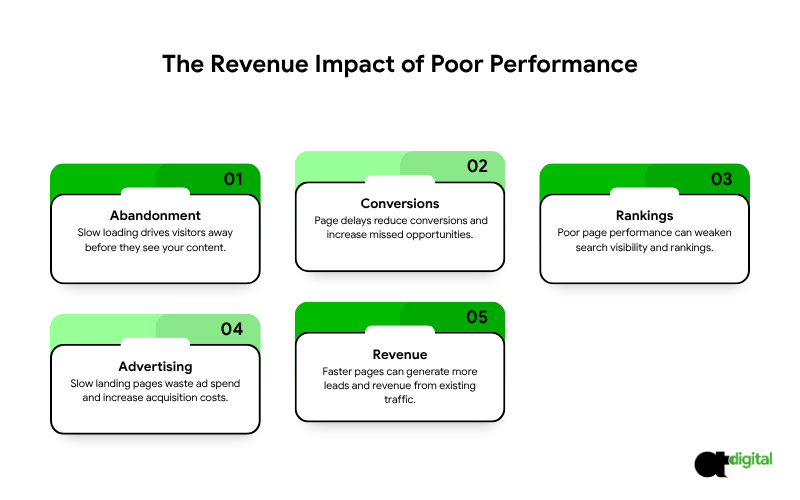
    Lost visitors, before they see anything. The longer a page takes, the more people leave before your content even renders. That’s not a bounce from disinterest; it’s a bounce from impatience, and it’s the most preventable kind you’ll ever face.

    Lost conversions, at a scale that compounds. Akamai’s 2017 analysis of 10 billion retail website visits found that a delay of just 100 milliseconds, one-tenth of a second, was associated with a 7% drop in conversion rate. Read that again: not a 3-second delay. A tenth of a second. If your key pages are running 2 or 3 seconds slower than they should be, the compounding effect on conversions is not small.

    Weaker search visibility. Page experience, including Core Web Vitals, is one of many ranking signals Google uses. Great content and relevance matter more, but between two similarly relevant pages, the faster one has a real edge.

    More expensive ads. If you send paid traffic to slow landing pages, you’re paying for clicks that leave before converting. Landing page experience also feeds into Google Ads Quality Score, which directly affects what you pay per click. If your ad spend and your site speed aren’t working together, see our PPC management services alongside the fixes below.

    A concrete example. Suppose your site gets 10,000 visitors a month and converts 2% into leads, or 200 leads. If speed improvements lift that to 2.4%, a realistic gain from fixing the issues below, that’s 240 leads from the exact same traffic. At a lead value of $100, that’s an extra $4,000 a month, without spending a dollar more on marketing. This is illustrative math, not a guarantee, but it shows the shape of the opportunity: speed fixes are one of the few improvements that pay you back in the traffic you already have.

    How to Measure Your Website Speed

    Don’t guess. Test.

    Use PageSpeed Insights. Enter a URL and choose the mobile tab. It shows two kinds of data: field data from real Chrome users, and lab data from a simulated test. Prioritize the field data when it’s available, since that’s what real visitors actually experience, not a simulation.

    Check Google Search Console. The Core Web Vitals report groups your pages into good, needs improvement and poor, so you can spot patterns across the whole site at once.

    Test more than your homepage. Check your top service pages, landing pages, contact page and checkout. Those are the pages where speed directly converts into revenue.

    Test on mobile and on a slower connection. Most of your visitors aren’t on office fiber. Tools like WebPageTest let you simulate real-world conditions.

    Record your baseline before changing anything, so you can actually prove the improvement afterward.

    What Usually Makes Pages Slow

    If your site has very slow loading web pages, the cause is usually one or more of these:

    • Oversized images uploaded straight from a camera or design tool
    • Too many scripts, especially third-party ones like chat widgets, trackers and social feeds
    • Cheap or overloaded hosting with no caching
    • Heavy themes and page builders that load code the page never actually uses
    • Render-blocking CSS and JavaScript that delays the first paint
    • Unoptimized fonts and too many font families
    • Auto-playing video in the hero section
    • Layout shift from banners, ads and images without set dimensions

    Web Performance Optimization Techniques: The Priority List

    Work in this order. The first items usually deliver the biggest gains for the least effort.

    • Optimize images. Compress them, use modern formats like WebP or AVIF, size them to the space they occupy, and lazy-load images below the fold. Don’t lazy-load the main image at the top of the page, since that delays your LCP score directly.
    • Improve hosting and caching. Use reliable hosting, enable page caching, and add a content delivery network so files load from a server physically near the visitor.
    • Cut and defer scripts. Audit every third-party tag. Remove what you don’t use, and delay what isn’t needed at first load.
    • Streamline CSS and JavaScript. Minify files, remove unused code, and avoid render-blocking resources.
    • Fix fonts. Limit font families and weights, and make text visible while fonts load rather than invisible.
    • Prevent layout shift. Set width and height on images, and reserve space for banners and embeds before they load.
    • Re-measure after each change. Confirm every fix actually helps, and that nothing else breaks in the process.

    Want These Fixes Made Without the DIY Risk?

    We optimize your images, hosting, scripts and code, then re-test until you pass Core Web Vitals, without breaking your forms or tracking.

    Book My Speed Fix Now →

    WordPress: How to Improve Site Speed

    Many small business sites run on WordPress, and it can be fast when configured well. A WordPress improve site speed checklist:

    • Choose quality hosting and keep PHP up to date
    • Install one reputable caching solution, not several that conflict with each other
    • Compress and resize images automatically on upload
    • Delete unused plugins and themes, and replace heavy plugins with lighter alternatives
    • Use a lightweight theme, and avoid loading a page builder’s full library on simple pages
    • Add a CDN
    • Clean the database periodically

    A fair note: custom-coded sites can be leaner, but a well-maintained WordPress site is fast enough for most businesses. Discipline matters more than the platform underneath it.

    Website Speed for Small Business: Start With the Free Wins

    You don’t need a big budget to see meaningful improvement. A sensible order:

    Week 1: Measure your key pages and record the baseline. Week 2: Compress images and enable caching. Week 3: Remove unused plugins and scripts, and fix layout shift. Week 4: Retest, compare, and decide whether the remaining gap justifies professional help.

    Often, the first two weeks deliver the largest visible gains, before you’ve spent a cent on outside help.

    Fast-Loading Website Design Starts With Design, Not Just Code

    Speed isn’t only a developer’s job. Design choices decide how much a page has to load in the first place:

    • Skip autoplay hero videos and heavy sliders unless they genuinely earn their weight
    • Use a small, consistent number of fonts and image sizes
    • Keep the first screen simple and focused on one message
    • Agree a performance budget before design starts, such as a maximum page weight and an LCP target

    A beautiful page that loads in six seconds is not beautiful to the 53% of mobile visitors who already left after three.

    When to Hire Website Speed Optimization Services

    You can handle the basics yourself. Consider professional website speed optimization services if:

    • You’ve done the basics and still fail Core Web Vitals in field data
    • Your site is heavily built with page builders or custom functionality
    • You run an online store, where speed affects revenue directly, not just experience
    • You need fixes made safely without breaking layout, forms or tracking

    A good page speed optimization service should:

    • Measure before and after using real-user field data, not just a lab score
    • Prioritize fixes by expected impact, not by whichever is easiest to bill
    • Explain what was changed and why
    • Protect functionality, including forms, tracking and checkout

    Be cautious of anyone who guarantees a perfect 100 score. A perfect score isn’t the goal. Passing Core Web Vitals and improving real conversions is.

    The Verdict: Fix Your Fastest-Leaking Page First

    Here’s the math that should drive your priorities: a 100-millisecond delay costs roughly 7% in conversions, and 53% of mobile visitors abandon anything past three seconds. If your key landing page is running even two seconds slower than it should, you’re not looking at a minor optimization opportunity. You’re looking at a leak that’s costing you real revenue every single day it goes unfixed.

    You don’t need to fix your entire site at once. You need to fix the one page that costs you the most: your best-converting landing page, your top service page, or your checkout. Measure it today, fix the biggest issue this week, and re-measure. The $4,000-a-month example above isn’t a hypothetical for every business, but it’s the right shape of thinking: speed fixes pay you back in the traffic you’re already paying to attract.

    Every day your site stays slow, you’re paying for clicks and rankings that a faster competitor converts and you don’t. Our speed audit tests your key pages on real mobile connections right now and tells you exactly what to fix first, in the order that gets you the fastest return. Book it today, and stop losing visitors before they even see what you offer.

    Stop Losing Visitors Before They See Your Site

    Engineering-grade friction analysis. Pure mathematics. Zero sales scripts.
    Get My Speed Audit Now →

  • The Silent Closer: Engineering the Digital Infrastructure That Outperforms Your Human Sales Team

    The Silent Closer: Engineering the Digital Infrastructure That Outperforms Your Human Sales Team

    THE PERFORMANCE REVIEW: IS YOUR WEBSITE SLACKING?

    THE OPERATIONAL AUDIT

    • Annual Working Capacity: 8,760 hours with zero sick days.
    • Simultaneous Prospect Capacity: Infinite.
    • The Financial Penalty: 88.0% of prospects will never return to a site after a single negative experience.

    If your website were a human employee, you would have terminated them months ago. Imagine hiring a Senior Sales Director with a massive signing bonus and a premium salary. You give them total access to your hottest leads and the best tools in the industry. Then, they spend 23 hours a day sleeping. When they finally speak to a prospect, they mumble, use confusing jargon, and completely forget to ask for the transaction.

    You would terminate that employee for gross negligence before the end of their first week. Yet, most enterprise firms tolerate this exact behavior from their digital infrastructure every single day. They treat their digital storefront as a passive brochure rather than a high-performance operator. They waste capital on subjective aesthetic trends instead of demanding objective operational ROI.

    At AtheosTech Digital, we do not design websites for artistic validation or “creative” awards. We engineer The Silent Closer. We view UI/UX as a strict, mathematically optimized behavioral script that either forces a conversion or permits a bounce. Your digital architecture should be your most consistent, most persuasive, and most profitable employee. It is time to stop hoping for engagement and start commanding the close.
    This briefing outlines the exact forensic metrics required to evaluate your website as a strategic hire. You are about to discover the architectural shifts needed to turn a passive liability into a high-velocity asset that out-works and out-closes your top-tier human sales reps.

    THE 3-SECOND PERFORMANCE REVIEW

    (The Cost of a Slow Response)

    THE PUNCTUALITY AUDIT

    • User Expectation: 2.0 seconds or less.
    • The Abandonment Threshold: 3.0 seconds.
    • The Financial Penalty: A 1.0 second delay results in a 7.0% reduction in conversions.

    If your website takes more than 3 seconds to load, your digital employee has effectively walked out of the boardroom before the prospect even finished their first sentence.

    In the high-velocity corporate sector, speed is the ultimate metric of professional respect. Statistics prove that 47.0% of users expect a load time of 2.0 seconds or less. Every millisecond of delay is a financial leak that directly impacts your bottom line. A slow site does not just annoy users; it signals operational incompetence and a total lack of technical discipline.

    “The 3-Second Rule: How Speed Impacts Your Bottom Line.”

    The Efficiency Protocol

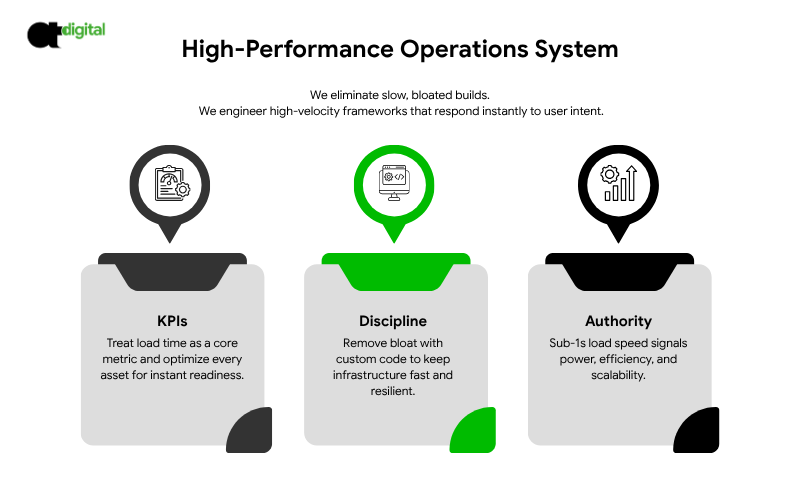
    At AtheosTech Digital, we do not tolerate digital tardiness. We do not build bloated, heavy sites using fragile, off-the-shelf templates that are weighed down by unnecessary code. Instead, we engineer high-velocity frameworks that respond instantly to user intent.

    The Performance Mandate:

    • Non-Negotiable KPIs: We treat load time as a primary operational metric. If the site is not fast, the employee is failing their most basic duty. We optimize every asset to ensure the “Silent Closer” is ready the moment the prospect arrives.
    • Technical Discipline: We strip away the digital clutter. By using custom-coded solutions rather than heavy plugins, we ensure your infrastructure remains agile and responsive under high-volume traffic.
    • First Impression Authority: A site that loads in under 1,000 milliseconds communicates power. It tells the executive prospect that your firm is efficient, modern, and ready to handle their business at scale.

    The Reality of Speed: Speed is not a luxury; it is a conversion requirement. When you eliminate the wait, you eliminate the first and most common reason for a prospect to choose your competitor.

    THE MOBILE-FIRST MANDATE

    (Visibility in the Modern Boardroom)

    THE VISIBILITY AUDIT

    • Global Mobile Traffic Share: 60.2%
    • B2B Executive Behavior: 70.0% of decision makers use mobile devices to research enterprise solutions.
    • The Search Reality: 100% of new websites are now evaluated by Google using mobile-first indexing.

    If your website is not perfectly optimized for mobile devices, you have hired an employee who refuses to show up for 60.0% of your potential meetings.

    Google has moved to a ruthless mobile-first indexing model. This means that if your digital storefront looks elite on a desktop but fractures on a smartphone, you are effectively invisible to the world’s most powerful search algorithm. Market leaders recognize that the modern boardroom is mobile. An executive is just as likely to review your million dollar proposal on a phone during a commute as they are on a high-end laptop in a conference room.

    “Mobile-First Reality: Why Google Ignores Desktop-Only Sites.”

    The Omnipresence Standard

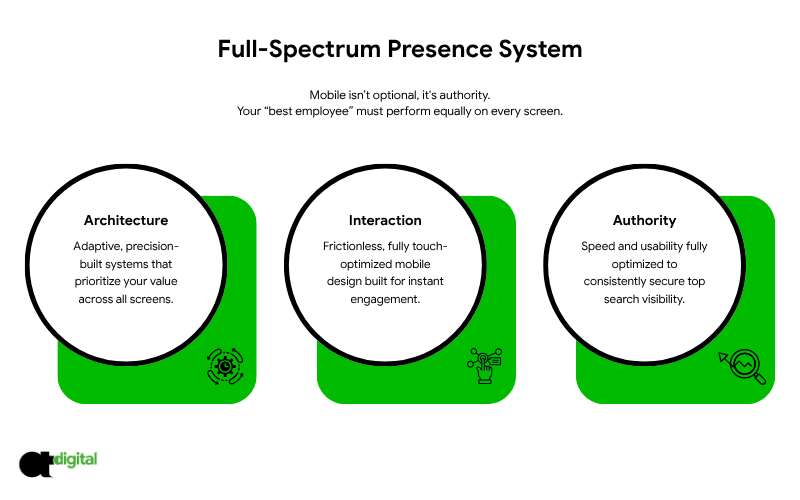
    At AtheosTech Digital, we do not view mobile optimization as an afterthought. We view it as a non-negotiable requirement for professional authority. Your “best employee” must be as effective and persuasive in a prospect’s hand as they are on a massive boardroom projector.

    The Mobile Execution:

    • Adaptive Architecture: We do not build “shrunken” desktop sites. We engineer responsive architectures that reflow and adapt with mathematical precision. We ensure that your value proposition is the first thing an executive sees, regardless of their screen size.
    • Frictionless Touch Interaction: We eliminate the design mistakes that lead to mobile frustration. We ensure that every button is accessible, every lead form is thumb-friendly, and every call to action is positioned for immediate engagement.
    • Algorithmic Dominance: By optimizing for mobile speed and usability, we satisfy the strict requirements of search engines. This ensures your “Silent Closer” remains at the top of the search results, ready to intercept prospects before they ever find your competition.

    The Visibility Mandate: If you are not visible on mobile, you do not exist in the modern sales cycle. We ensure your digital infrastructure maintains absolute authority on every device, every time.

    THE CONVERSION ENGINE

    (CRO: Training Your Site to Close)

    THE CLOSING AUDIT

    • Standard B2B Conversion Rate: 2.2% to 3.1%.
    • CRO Optimization Lift: Potential for 100% to 400% increase in lead volume.
    • The Efficiency Win: Doubling your leads without spending an extra $1.00 on traffic.

    A “Worst Employee” website merely exists. It sits in a digital corner and waits for the prospect to take the initiative. A “Best Employee” website is predatory. It actively extracts data, qualifies the visitor, and moves the lead toward a terminal decision.

    Conversion Rate Optimization (CRO) is the engineering process of training your digital employee to stop mumbling and start closing. Most sites fail because they prioritize fleeting creative trends over hard sales psychology. They build for awards while we build for the ledger.

    “CRO Basics: Simple Tweaks to Double Your Leads.”

    The Extraction Logic

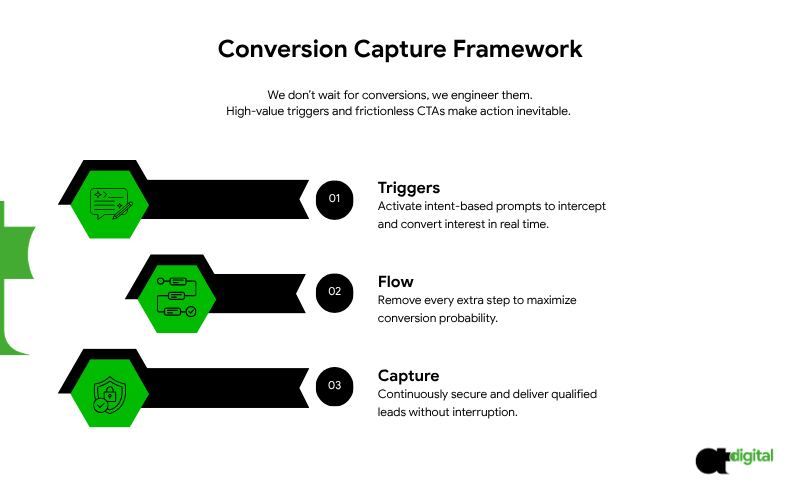
    At AtheosTech Digital, we do not “hope” for a contact form submission. We engineer the environment to make it inevitable. We install high-value intellectual tripwires and frictionless calls to action throughout your entire digital architecture.

    The Closing Tactics:

    • Intent-Based Triggers: We replace passive “Contact” buttons with active, intent-based triggers. If a prospect lingers on a specific service page for 45 seconds, the “Silent Closer” intercepts them with a high-value asset tailored to that exact interest.
    • Frictionless Pathing: Every extra field in a form is a 10.0% drop in conversion probability. We strip away the friction. We ensure that the path from “interested” to “invested” is a straight line with zero obstacles.
    • Persistent Lead Capture: Your website functions as a lead-capture machine that delivers hot, qualified prospects to your CRM while your human team is off the clock. It never forgets a follow-up; it never misses a detail.

    The Closing Reality: You do not always need more traffic. Most often, you need a website that actually knows what to do with the traffic you already have. We turn your passive visitors into cleared invoices through pure behavioral engineering.

    CONCLUSION: THE BOARDROOM ULTIMATUM

    THE OPPORTUNITY COST OF MEDIOCRITY

    • The Revenue Gap: A site converting at 1.0% requires 400.0% more ad spend than a site converting at 5.0% to hit the same target.
    • The Attrition Rate: You are currently losing 8 out of 10 mobile prospects due to architectural friction.
    • The Terminal Status: If your website is not your top lead generator by the end of 2026, your digital strategy is obsolete.

    If your current website is merely a digital placeholder, it is a liability. It is a “Worst Employee” that is costing you market share every single minute it remains active. You are paying for its hosting, its maintenance, and the traffic it wastes.


    It is time to implement absolute structural discipline. Stop viewing your website as a design project. Start viewing it as a strategic, high-stakes hire that must produce a measurable, mathematical return on investment.

    THE DIGITAL PERFORMANCE REVIEW

    Is your website a strategic asset or a sunk expense?

    At AtheosTech Digital, we do not offer subjective critiques. We perform Forensic Audits on the digital infrastructure of high-tier corporate entities. We treat your code like a ledger and your UI/UX like a sales script.

    Give us your URL. We will run a strict, black and white diagnostic to determine if your “Silent Closer” is actually working or just taking up space.

    The 72-Hour Deliverable:

    • The Friction Audit: We identify the exact points where your UI/UX is failing to convert and forcing prospects to bounce.
    • The Velocity Report: We expose the slow load times and heavy backend bloat that are currently bleeding your revenue.
    • The Capture Blueprint: We map out the “Best Employee” version of your site, including high-velocity extraction points and automated closing triggers.

    (Engineering-Grade Analysis. Pure Mathematics. Zero Sales Scripts.)